


Showing posts with label Google Docs. Show all posts
Showing posts with label Google Docs. Show all posts
Wednesday, January 14, 2026
Google Forms gain response limits by date or number


Sunday, October 9, 2011
Google Docs New Look

Is you rely on Google to work and manage your docs, you've probably noticed Google Docs new look. A look that was improved based on user's feedback, and that - at least for me - looks like another step in the right direction.
Sure, the color scheme might not look as "cool" as the previous version, and even look a bit "flashy" - but at least it adds enough contrast to lets us easily sort through what we're trying to find.
But, better yet, the thing I just love the most... We can now select the display density setting! This was one of my biggest complaints (and still is, in the case of Blogger's dashboard - but I hope Google will eventually implement a similar option there).

This allows us to have a visual appealing "Comfortable" setting... but also having a "compact" mode that allows us to put to use all the available screen estate we have.
I just hope the Blogger team won't take too long to "copy" this feature... ;)
Friday, May 20, 2011
How to Remove Duplicate Rows in Google Docs

If you're an avid fan of Google Docs and use its spreadsheet regularly here's a tip that might come in handy.
Ever wished you'd be able to remove duplicate rows of info? For instance, imagine you have a long list of emails, but there might be duplicate entries and you need to get a list without any duplicates.
Instead of trying to do it manually and waste a lot of time, you can simply use the UNIQUE function.
Just place your cursor in an empty cell and enter:
=UNIQUE(...)
and select the area with the duplicate rows to process. And that's it!
Hope you'll find it useful.
Wednesday, May 18, 2011
Google Docs gets Pivot Tables

Month after month, Google Docs is becoming more and more useful and learning things that will certainly appeal the more advanced users. Now, Google Spreadsheets can create pivot tables.
As Google puts it:
A pivot table report is a dynamic table that lets you interpret data in different ways without ever having to enter a formula. Pivot table reports are particularly useful when you want to narrow down a large data set or analyze relationships between data points.So... what are you waiting for? Are you still using an installable spreadsheet that you can use only in your own PC, when you could be using Google Docs which is accessible via any (decent) web browser?
In just a few clicks, you can summarize and analyze a large set of data through different categorizations and calculations. For example, from a list of students in a college class, you can get a quick understanding of the the age distribution of and number of science majors in the class.
Saturday, March 19, 2011
Google Docs New Discussion System

Collaborative work in Google Docs just got easier and better than ever. There's a new Google Docs discussion system that makes working with multiple people a lot simpler. You can easily see comments and requests from anyone, and you don't even have to worry about the people being online at the moment to read it - as the system automatically sends emails (and allows you to reply to them).
If a picture is worth a thousand words, nothing like a video to make it worth a million words: see it for yourself.
(And keep in mind this will only affect newly created documents for now...)
Thursday, November 18, 2010
Google Docs Mobile Editing


After the editable spreadsheets, Google has now given another step into the mobile Google Docs usability: you can now edit Google Documents in a mobile device.
Until now, you could only read it, but not edit it or do any changes (only in the spreadhsheets).
Now you can do full document edits, with changes being show in real-time across shared docs - you can even use it as a way to chat between a group of friends or co-workers (almost making it a "Google Wave").
Thursday, July 1, 2010
Google Doc Viewer Mobile
I've been using Google Docs Viewer to view PDFs for a long time, but now Google made it even easier when you're out of the office with their Google Docs Viewer for Mobile. You can now use Google Docs viewer on your iPhone, iPad and Android device.
 No longer will you have to worry about viewing PDFs, .ppt, .doc and .docx files.

Tuesday, October 27, 2009
Batch Convert to PDF using Google Docs
 Have a lot of documents you want to convert to PDF but haven't a suitable program nearby? How about letting Google Docs do the work for you?
That's right. You can use Google Docs to batch convert multiple docs to PDF.
It's quite easy and simple. Just create a new folder where you'll upload all the documents you want to convert into.
Google Docs recognized formats are:
- Microsoft PowerPoint (.ppt, .pps).
- Microsoft Word (.doc, .docx), OpenDocument (.odt) and StarOffice (.sxw).
- Microsoft Excel (csv, .xls, .xlsx) and OpenDocument Spreadsheet (.ods).

Couldn't be easier. :)
Wednesday, July 8, 2009
Gmail, Docs, Calendar and Talk lose Beta status

For the most part, you shouldn't notice any difference, so... just keep on using it as you've always done before.
Thursday, May 7, 2009
OffiSync - MS Office meets Google Docs
Have you ever wished ypu could have all the sharing and collaborative editing features of Google Docs with the more advanced functions of a native desktop application like Microsoft Office?
Well... now you can. Just see what OffiSync has to offer:
Well... now you can. Just see what OffiSync has to offer:
Saturday, March 28, 2009
Google Docs Security Flaws
 If you use Google Docs a lot - like myself and many million others around the world - then you should be aware that not everything is as secure as you might think.
I personally believe that the advantages still outweigh the disadvantages, and that the only sure way to keep things private is keeping it in your local computer (preferably discconected from the internet) and/or keeping it under a secure layer of encryption. But, it's always nice to be up to date in the latest security flaws of a service so many have grown to rely on.
So, what's the matter with these Google Doc's security flaws?
First of all, it seems that any image you embed in a document - even a private/protected one - can quite easily be viewed by anyone out there
Not only that, by sharing a document with someone, you open the door to someone being able to view previous versions of any diagram you might have made. Imagine someone digging up any "secret info" you deleted for that final public presentation... doesn't sound good, does it?
Last but not least, and perhaps the worse of them all - after you remove someone's permissions to access a file; there's till ahe chance they'll still be able to access it afterwards.
Now... that is annoying!
Sunday, February 15, 2009
Google Docs Spreadsheets on the iPhone
It won't be the most pleasant experience, but - at last - you'll be able to edit your Google Docs spreadsheets in your iPhone.

Until now, you could only view the documents - which was rather frustrating if you had to edit/fix just a single entry. Now you can do that.
This new feature is available for all mobile devices using WebKit-based browsers, like the Android G1 and the Nokia S60.
via [GoogleSystem]

Until now, you could only view the documents - which was rather frustrating if you had to edit/fix just a single entry. Now you can do that.
This new feature is available for all mobile devices using WebKit-based browsers, like the Android G1 and the Nokia S60.
via [GoogleSystem]
Tuesday, June 24, 2008
Google Docs Offline Mode
Now you can easily carry your Google Docs on your computer, even if you're offline and away from the Internet (requires Google Gears of course.)
Check the video to see how easy it is:
Anyway, I prefer to be "always-online"... even though that's not easy in some parts of the world (hence the need for these offline modes.)
Check the video to see how easy it is:
Anyway, I prefer to be "always-online"... even though that's not easy in some parts of the world (hence the need for these offline modes.)
Friday, February 29, 2008
Google Docs with Revamped Toolbar
Google has updated their Google Documents toolbar.
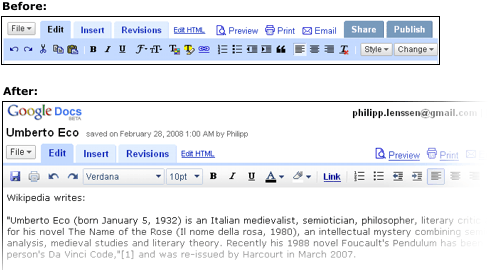
As you can see, choosing font type and sizes is now a lot easier and more intuitive. Choosing the font color and background is also less confusing.
Once again we see how convenient it is to use web apps, where these welcomed updates require no download or installs. You just browse to your documents and... you see the improvements. :)
via [Blogoscoped]
As you can see, choosing font type and sizes is now a lot easier and more intuitive. Choosing the font color and background is also less confusing.
Once again we see how convenient it is to use web apps, where these welcomed updates require no download or installs. You just browse to your documents and... you see the improvements. :)
via [Blogoscoped]
Subscribe to:
Posts (Atom)