Showing posts with label Malware. Show all posts

Monday, June 12, 2017

Malware turns Raspberry Pi into coin mining machines


The thought of the WannaCry ransomware attack is still very present in our memories but there is another round of targeted attacks affecting the popular low cost Raspberry Pi, this time using a different approach to make money out of it: mining cryptocurrency.


Wednesday, February 22, 2017

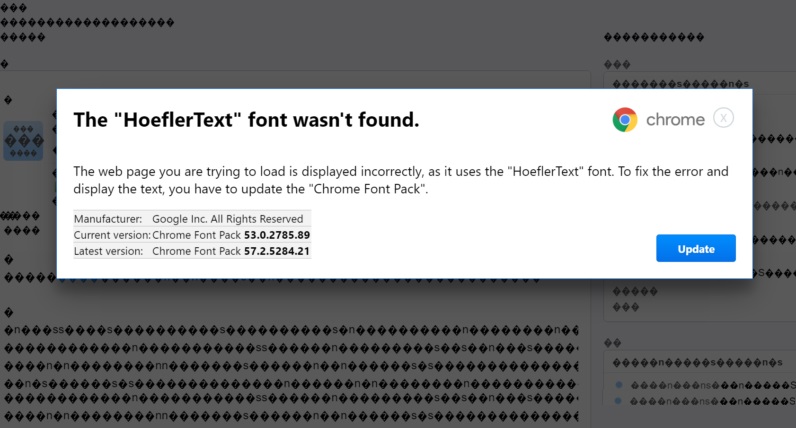
New malware tricks Chrome users via "missing font" warning


Attackers are always devising new ways to trick victims, and there's a new round of attacks going on as we speak, trying to trick Chrome users into installing malware by telling them there's a font missing.

Monday, January 30, 2017

RansomFree keeps your PC safe from ransomware


Ransomware is currently one of the nastiest forms of malware, but there's a new tool that promises to keep PCs protected even from unknown ransomware: Cybereason's RansomFree.

Monday, February 8, 2016

Internet Archive now holds a Malware Collection from MS-DOS time


MS-DOS is now fading into the distant memory of pre-Windows times of computers, but Internet Archive is now holding on to some of its most memorable viruses and malware.

Thursday, September 3, 2015

Android smartphones are being sold with pre-installed malware


We live in a age where many people are highly suspicious of all sorts of electronic devices; and now there's one more report that will contribute to that: with dozens of devices being found with malware pre-installed.

Tuesday, February 3, 2015

Adware on Google Play apps with millions of users


With hundreds of millions of users, the app stores are one of the most desirable methods to spread malware. And although there are systems in place designed to prevent it, it seems there's a new adware in apps used by over 5 million users on Google Play.

Thursday, August 7, 2014

DecryptoLocker unlocks your CryptoLocker locked files for free


Right in the wake of  Synology crypto attacks, two security firms joined forced to bring us a free solution for everyone facing the ransom demands of thr CryptoLocker malware.

Wednesday, June 18, 2014

Chinese Android smartphone comes with malware preinstalled


If you thought it was annoying enough to buy a smartphone that comes with a set of pre-installed apps you can't (easily) remove - what if you found out it had pre-installed malware as well? That's precisely what seems to be happening with a cheap Chinese smartphone you can easily get online.

Friday, July 6, 2012

DNSchanger Victims to Lose Internet Next Monday


If your computer is/was infected by the DNSChanger malware, you better fix it right now, as you'll be unable to access the internet starting next monday, July 9th.

This malware changed the DNS server settings in your computer/network, so that each internet access was routed via the attackers servers. To the user, everything seemed to be working as usual... but the attackers could see what you were accessing, and forward you to fake sites in order to grab your data. Next monday, the FBI will shut down these servers, meaning that anyone still using those will be unable to access the internet.


You can check to see if your vcomputer is infected with DNCChanger here.

Or you can manually check your DNS servers and make sure it's not one of the following.

  • 85.255.112.0 to 85.255.127.255
  • 67.210.0.0 to 67.210.15.255
  • 93.188.160.0 to 93.188.167.255
  • 77.67.83.0 to 77.67.83.255
  • 213.109.64.0 to 213.109.79.255
  • 64.28.176.0 to 64.28.191.255

If that's the case, you better set your ISP DNS server, or use OpenDNS (208.67.222.222 / 208.67.220.220) or Google's (8.8.8.8 / 8.8.4.4).

Monday, October 4, 2010

AdBlock Anti-Malware

Indispensable for millions, hated by others, the browser extension AdBlocker has saved countless browsers from annoying ads.
But, on the other hand, it also keeps you from supporting your favorites sites by "watching" their ads.

The truth is, even if you opt to choose seeing those ads, AdBlocker can still be of great help blocking malicious content.

You just need to subscribe to this malware list (it's on the bottom of adblocker's official page), and you can safely navigate around the web.

If you're using Firefox be sure to use Ad Block Plus, on Chrome you just need to go to "manage extensions" (right click on the extensions area) and add the same link manually to the AdBlock list.

You can even find a list to block the popular (but annoying) rickrolls! :)

Amazon Store