Showing posts with label Intel. Show all posts

Thursday, August 4, 2016

Intel recall Basis Peak fitness watches due to overheating


After Fitbit's rash problem, it's now time for Intel to face the "close encounter" problems of wearables, leading to the recall of all Basis Peak fitness watches.

Thursday, January 8, 2015

Intel Compute Stick is a Windows computer in "stick" format


Google's Chromecast made people realize they don't need ugly boxes to have media players/streamers; and soon after many more Android media players in similar formats popped up. But what if you wanted a complete computer, just like the one you have on your desk? Well, now you can, thanks to Intel's Computer Stick.

Thursday, June 5, 2014

Intel says goodbye to cables in 2016


Most people won't imagine going back to the days where getting "connected" meant plugging in a network cable. Our mobile devices made wireless access something we simply take for granted, and Intel is working to make our future truly cable free in the upcoming years: and that means cutting the power cable as well.

Thursday, September 13, 2012

Intel NUC to cost $399


Do you recall the Intel NUC da Intel - Intel's "Next Unit of Computing" that packs a fully working computer into a tiny 4x4" area? After it's unveiling a couple months back, we finally get to know some more details about it, as it has certainly generated a lot of interest in all those looking for a compact computer setup.


The NUC comes with a Core i3 CPU and a 7-series chipset, 1x mini-PCIe slot, mSATA, 2x SO-DIMM, 3x USB, ethernet, and 2x HDMI out. Power can either be provided from an external AC/DC power source, or using a small 2-pin header for an internal power supply (if you're looking for a computer do put in your car, might not get any better than this. :)


Intel says the NUC systems will be available before the end of the year, with prices around $399 - including a small mSATA SSD (but with no operating system).

Although it isn't exactly cheap (you can find compact barebone systems at much affordable prices) I'm sure the NUC will eventually become a popular computer format, that takes us one more step away from the old and bulky computer cases/systems. Large computer cases will mostly be left for power users, wishing to install dozens of hard drives/SSDs, powerful graphic setups (SLI/CrossFire), etc. For most others... a tiny - or even "invisible" - computer, would be greatly appreciated.

Thursday, August 30, 2012

Wireless Electricity is Coming in 2013 - Says Intel


We've grown accustomed to having to plug in our smartphones and other mobile devices whenever they require charging... but truth be told - it's a real pain. Particularly when you have to move away from our carefully planned places where we have the appropriate cables and adapters for each and every device we own. And although microUSB has tried to become a charging standard (and succeeded, to certain extent) there are still devices that require adapters or their own proprietary plugs.

Intel now taunts us, saying that - finally - wireless charging will become a reality in 2013. And let's hope that means a wireless charging becoming a real standard, rather than those odd wireless chargers some brands have been offering as "options". (Who can imagine a future where each device will require each own, specific, wireless charger... that would be really insane!)

So... in 2013, we might begin to charge our smartphones simply by placing them next to a laptop, or other wirells charger device, and I hope that also means larger area charging mats that we can place on (or even under) our desks and tables, so everything can be kept charged just by placing the devices there.

Thursday, August 2, 2012

Intel Sensor Requirements for Ultrabooks


Intel doesn't want to be caught off guard on the ever increasingly popular tablet segment that is conquering the market. Besides the ever ruling iPad, Android tablets are also becoming increasingly popular, and lets not forget that Intel will even have to face Windows RT Arm tablet competition.

To ensure its Windows 8 tablets will have a fighting chance, Intel has defined a set of 5 sensors required to be a part of a new breed of convertible/hybrid ultrabooks.

Sensors that have become quite common on mobilde devices, but are mostly missing from regular laptops and ultrabooks:
  • Compass
  • Accelerometer
  • Gyroscope
  • GPS
  • Ambient Light Sensor


To be considered a convertible ultrabook, a device must have all 5 sensors... though you can do away with compass and gyroscope if you want to build a simpler ultrabook (thought the other 3 sensores are still recommended).

Do you think Intel powered costlier ultrabooks/convertibles will be able to compete with the cheaper ARM tablets? We'll soon find out... (And by soon I mean, give it another couple of years. Though we'll soon get a grip of things are turning out, depending on how the market will react to Windows 8 launch.)

Friday, May 6, 2011

Intel Announces 3D Transistors


Looks like Moore's Law just got another extension. This "law", that states that the number of transistors on a chip can double every couple of years and that has serve as a guideline, allowing us to experience the amazing evolution in electronics we've had in the past decades seems to always find a way to be fulfilled.

Once again, when it seemed there wasn't much else that could be done, Intel announced a revolutionary new fabrication method that allows them to create 3D transistors. The very building blocks of most electronic "stuff".

Why should you care? This means that their new Ivy Bridge 22nm CPUS, arriving later this year, will be a lot faster while using much less power. They say it can save up to 50% power in comparison to current chips.


Monday, February 7, 2011

OASIS Legos


Playing with LEGOs is about to become a lot more interesting, thanks to this OASIS (Object- Aware Situated Interactive System) from Intel Labs.
Using depth sensing cameras similar to the Kinect, this system allows the creation of interactive projections that can respond to objects and gestures.

The possibilities are endless... but even if it were just to play around with LEGOs... I'd be sold! :)

Sunday, January 2, 2011

Intel SSD 310 mSATA

The future of local storage is coming... fast. After the SSD modules used by Apple in their new MacBook Air models, here are the new Intel SSD 310. SSD drive modules that ditch the traditional and bulky enclosures (not needed any longer), and use a single PCIe-like connector which is, in fact, a micro SATA connector (mSATA).

This means that, before you know it, your "hard drive" will be pluggable just like a RAM memory module.
Lenovo has already show interest in using these SSD 310 modules - and while they'll only be available to OEMs at the moment; you can expect it to become commonly available in the near future, as board and computer start using this mSATA connectors.

These SSD Intel 310 will cost $99 and $179 (40/80GB) per 1000 units, with performance similar to the current equivalent Intel X25 drives.

Wednesday, May 26, 2010

16 SSDs in Raid 0

If one Intel SSD is good...

... I wonder how 16 of them in Raid 0 will be! :)

Actually, I wouldn't be that crazy. Besides, even a few of them would be enough to use up all the available SATA bandwidth and you wouldn't notice any further performance increase.

But... it would certainly make up for a good geek setup! :)

Thursday, November 19, 2009

iMacs with Core i7 - Fastest Ever

As lots of other computer users have had the chance to see, it's time for iMac Apple users to enjoy the amazing performance brought by Intel's Core i7 CPU to the new iMacs.


To put it into perspective, DVD ripping with Handbrake which took 147 minutes in a 3.06Ghz Core 2 Duo iMac, now only takes 43 minutes in a 2.8Ghz Core i - impressive!.


One of the features that makes the i7 CPUs so amazing is the "Turbo mode", allowing it to overclock some of the cores when the other ones are idling:

Friday, September 25, 2009

Multicore 3D Animation

Now that multicore CPUs with 4 and 8 cores are getting popular (and 16 and 32 cores will soon follow) its time we start using it to its full potential.

Intel has been hard at work trying to improve gamers experience. Why should your multicore CPU spend most of its time idling when it could be put to good use improving the scenery (for example)?

That what you can see in these Intel Demos (with full source-code.)

For instance, if you try their Horses demo in a dual-core CPU, you might get 235 horses running around the plains.


But if you run it in an 8 core i7, you'll see nearly 600 horses running around.


And the same thing can be done with particle systems as shown in this "Smoke" demo:


Tuesday, September 8, 2009

New Intel CPUs: the i5 and new i7s

Looks like Intel's newest CPUs are arriving, and these new Core i7 and i5 have a lot to offer.

The people at MaximumPC have done an excellent detailed analysis of these new CPUs, but I'll leave you with some highlights.

These new i7 and i5 were designed with one thing in mind: cost reduction. While the existing i7 CPUs offer amazing performance, they're also quite expensive - being reserved for the "high-end" range of the market, like professional use and hardcore gamers.
In the new series, some of its specs were tweaked - gone is the triple-channel memory; while the PCI-e controller is now integrated in the CPU - allowing the design of much cheaper motherboards.

While a bit more restricted, this configuration allows you to have amazing performance (similar and even better than the older i7-920) at a much lower price point. This will do for most people - leaving the "hardcore" segment with their higher performance X58 motherboards for full SLI power, etc.

One of the major issues is: these new i7 and i5 use a new socket: the LGA1156.This means that you can now have an i7 CPU that doen's fit a i7 motherboard (I think this was a bad move by Intel - but, they'll have their reasons.)

Now, you'll have to check if your i7 has a LGA1156 or the "regular" LGA1366 socket.
The LGA1156 will be a lot cheaper; but if you're planning on upgrading your CPU next year, for something like the upcoming i9 6-core/12-threads CPUs... you'll need to use the LGA1366.

However, for most people, the amazing performance/price ratio of these new i7/i5 processors will surely make them irresistible.

Monday, July 6, 2009

Intel readies 2nd Gen SSDs

While most of still dream with  Intel's X25-E SSD ans its 250-200MB/s read/write performance, Intel is ready to give us some more good news.

Intel is about to announce its 2nd gen SSDs which will be bigger, better, faster and... cheaper; thanks to their new 34nm NAND chips.

It seems we're running out of excuses not to have one of these SSDs in our computers.

Thursday, May 21, 2009

Intel Moblin for Netbooks

Instead of pushing an overweight OS into a tiny netbook, why not use an operating system specifically designed for it?

That's what Intel is trying to do with its Moblin project that is arriving at its 2.0 version.
As you'll be able to see in the following video, it is looking better by the day.


It's work a try; just download Moblin's live image and test it without messing up anything.

Sunday, November 16, 2008

Virtual Machine Migration from Intel to AMD

Ok, this video may not look like much... and it can even induce sleepiness in most people, but if you're reading this I assume you're interested in these topics. This video shows a virtual machine being transferred from one Intel PC to an AMD PC - while running - without any disruption.

Although this was shown during AMD's new "Shangai" Opteron processors presentation, the magic is provided by Red Hat virtualization, and isn't really tied to either Intel/AMD CPUs.

Wednesday, September 10, 2008

Not all SSDs are created Equal

Solid state disks (SSDs,) are the craze of the moment. These storage devices use Flash memory like the ones you can find in USB Pen drives and promisse to revolutionize the computer industry. However, there's also a dark side you should be aware of...

As anyone reading that has heard from it will be able to tell you, SSDs are awesome: no moving parts, nearly instantaneous acesses, the works!

That's the good part, however...

Not every SSD is created equal, and even if they use the exact same Flash memory chips, the device chipset and controller can make all the difference in the world. To make it worse, this is the kind of thing hidden away inside its case - not something you can tell by looking at its enclosure.

That's why we need to be careful when we see things like this SSD OCZ Core 32GB costing just $99 while others cost substantially more like this SSD from Intel costing $595.
Some people might be led to believe that such a huge price difference will more than cover the smaller size and slightly slower performance.

But things are not that easy...

Although Flash memory has some advantages, they also have one very annoying drawback: its write cycle times. (Not to mention the limited number of write cycles each cell can endure, but that's another issue.)

Simply put, when you write a very small 200 byte file to your SSD, internally it will need to erase a full "page" (which might be 256KB or even larger) which takes a very long time - relatively speaking.

You've probably noticed that already: when you copy  file to a USB Flash disk, it takes quite a bit longer to write to it than to read it back to the disk.

To mess things up even more, there are different flash types available, the most common used in SSDs being SLC and MLC.
MLCs are cheaper - and as you'd might imagine, slower. However, when combined with an intelligent controller even these "low-cost" flashs can beat SLC SSDs with "dumb" controllers.
(Intel MLC SSDs are a prime example of this, beating many SLC SSDs from other manufacturers.)

So, what does this all mean anyway?

It means that in some cases, SSDs like OCZ Core can become annoyingly slow and grind your computer to an halt for several seconds.
Check the worst case scenario below:


While an Intel SSD takes 0.09ms to perform a 4K write, an OCZ Core takes thousands of times more - worst case being nearly 1 second!

In real world this can mean you'll have to endure frequent system "hiccups" or even be unable to install Vista (besides taking a long time, it seems Vista doesn't handle well those lengthy write operations and gets corrupted somehow.)

Again, keep in mind I'm talking about the OCZ Core and similar SSDs - other SSDs like the one from Intel performs just like we expect an SSD to perform: flawlessly!

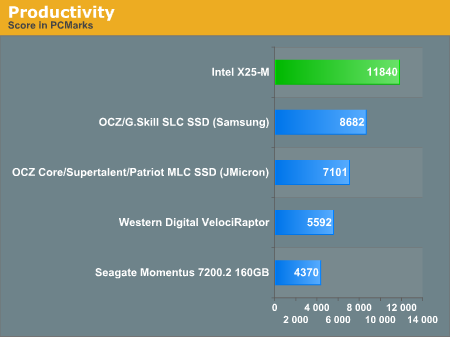
Of course, there are tasks where even a poorly designed SSD can perform extremely well; like you can see in this benchmark that is executing 4 tasks together: searching Windows contacts, searching Windows mails, browsing in IE7, and launching applications.


Even though slower than faster and better designed SSD, it still beats magnetic hard drives.

However, you have to remember that you might have to face those dreaded deadlocks for a few seconds every now and then. So, keep that in mind when you see some extra low-cost offering for an SSD.


If you want a much more in-depth review about SSDs and its internal workings, be sure to read:
[Detailed performance analysis at Anandtech]

Saturday, August 23, 2008

Wireless Electricity

One of the last barriers keeping us from living a truly wireless life is about to smashed: wireless electricity!

That's right, we'll soon be able to kiss those dreaded power cables goodbye.

And while many companies have promissed that (and failed to deliver) I think this time it may be different, because it's none other than Intel itself saying it!

Intel has shown that it could transmit electricity wirelessly over a dozen inches with 75% efficiency (previous systems were only able to achieve 50% efficiency at best.)

So, it really seems we may have some cablefree gagdgets in the near future afterall.

Amazon Store