Showing posts with label Laptops. Show all posts

Friday, September 2, 2011

Razer Announces Gaming Laptop with Mini Touchscreen


Looks like Razer isn't too worried with everyone claiming the PC gaming market is finished. They've just announced a powerful gaming laptop that will certainly make everyone turn their heads.

As any gaming laptop should be, its hardware specs are... up to date:
  • 2.8GHz Intel® CoreTM i7 2640M Processor
  • 8GB 1333MHz DDR3 Memory
  • 17.3" LED Backlit Display (1920x1080)
  • NVIDIA GeForce® GT 555M with NVIDIA® OptimusTM Technology (2GB Dedicated GDDR5 Video Memory)
  • Built-in HD Webcam
  • Integrated 60Wh Battery
  • 320GB 7200rpm SATA HDD
  • Wireless Network 802.11 b/g/n Compatible
  • 16.81" (Width) x 10.9" (Depth) x 0.88" (Height); 6.97lbs (Weight)
  • It will ship in the fourth quarter of 2011 for $2,799.99.


And altough it's $2,800 price tag certainly is steep, one should be satisfied to know that Razer hired the team behind OQO and several engineers coming from Apple, Dell, and other manufacturers. So... it looks like they certainly have the capability to do something "excellent".

But more than its hardware specs, the one thing that makes this Razer Laptop stand from the rest is the mini multitouch screen and 10 dynamic buttons it has next to its keyboard.


This touchscreen and buttons can play a major role in the success of this product, and will hopefully help games add a new layer of immersion in the way we control it.
(And besides games, we can envision a lot of possibilites in photo and video editing programs, 3D modelling software, and... lots others)

I just hope Razer will soon launch a "mini touchscreen+buttons" assembly than we can use in our own PCs, and that will help bring this system to a larger number of gamers - while at the same time making it more appealing for developers to support it.

Thursday, June 17, 2010

Hitachi Travelstar - Fastest Thinner Laptop HD

It's amazing to see what Hitachi has achieved, building a laptop drive that not only measures 7mm high (almost 50% less than regular laptop hard drives)  but also spins at an incredible 7200rpm and reaches 1,334Mbps max transfer rate over its 3Gbps Sata connection.

With manufacturers always in search for smaller and narrower storage devices for their ultra-thin devices, I guess it won't take long till we see this Hitachi Travelstar Z7K320 (320GB) in consumer devices.

Sunday, December 20, 2009

Upgrade your Laptop drive with an SSD

If you have a new (or aging) laptop and won't stand any longer for the hard drive spinning around while you wait for an application to launch: why not replace it for an SSD?

That's what I convinced one more friend to do, and the chosen model was the 80GB Intel X25-M. If cost is an issue, you can find cheaper models (like the new 64GB Kingston SSDs that show around for under 120 euros.)

If you want a detailed analysis, check out this Anandtech article about the X25-M.


... but it's time to get back to work:


Replacing your laptop hard drive is often just a matter of flipping it over and accessing the hard drive compartment. But as always, in my case, my friend's Sony Vaio forced us to dissamble the case and keyboard in order to gain access to it.


He also took the chance to upgrade to Windows 7. Win7 is the first OS from Microsoft that properly recognizes SSD and configures itself accordingly. Unneeded services like automatic defrag and indexing are automatically disabled (if you're using an older Windows version, be sure to disable it yourself.)
There are also some other advanced issues like partition alignment; but you can google around for it - I'll assume that if you're willing to spend money on an SSD, you'll also be running the latest OS version you can get.

Once installed, you can immediately notice the difference. Booting up the OS takes under 20 seconds. All the tiny pauses we grew accustomed to endure are now gone (making us notice just how much time we had to wait before.)
You can actually continue to work on your laptop while a virus scan or other disk intensive operation is running!

The only issue was that his Sony Vaio comes with two graphic cards: one Intel for "low power operation", and one Nvidia Go 7600 for "performance".) Sony doesn't seem to have Windows 7 64bits drivers... and trying to install either drivers results in failure - so, I'm yet to figure out to solve this issue (and once again leaving me with a really bad impression of Sony.)

But, even with just a generica graphic card, the SSD benefits can be seen and felt at every key stroke, at every mouse click. Thing just "happen" without any delays.
This is indeed one of the things everyone should experience to see the difference.

What about your old hard drive? Well... my suggestion is buying an external USB HDD case (around 10 euros) and using it as a backup drive for your data.


Monday, November 9, 2009

Laptop with External Graphic Card

Want a small and light ultraportable laptop to hang around with you all day; but can't stand the lame performance these devices have when it comes to play 3D intensive games when you're back home?

Looks like you need one of these Gigabyte Booktop M1305 with an external graphic card in the docking station:


When alone, this Booktop relies on its Core 2 DuoCPU , 4GB of DDR3, 320 or 500GB hard drive, and an integrated GMA 4500MHD graphic chip feeding its 1,366 x 768 LCD - but when you connect it to its docking station, you then have the full power of an NVIDIA GeForce GT220 chip at your command.

Saturday, July 18, 2009

Alienware Psychadelic Keyboard

It's no secret I'm really fond of LEDs and illuminated keyboards... But I guess some manufacturers are taking this a but too far.

Just check the keyboard for the new Alienware M17X:


Of course, you don't really have to use it like that; the keyboard has four separate lighting areas you can adjust independently.

So, you could use it all with the same lighting colour - or, as seen in the photo, as an 80's disco lighting ground.

Nothing you wouldn't expect from a laptop that costs nearly $5000 USD fully loaded.

Thursday, November 27, 2008

MacBooks Slow Down without Battery

Here's something I wouldn't have believed if it wasn't on Apple's website.

It seems like Apple's MacBooks and MacBook Pros slow down their CPUs if they don't detect their battery attached.

Well, a lot of people usually removes their laptop's battery when working for long periods at home or at the office, to minimize wear and tear.

But, if you own an Apple laptop, doing that will cost you... a lot. We're talking about a 30% slowdown in processing speed!
Apple's official explanation is that this is done to prevent the laptop from shutting down if the A/C power adapter is unable to provide enough power to keep the laptop working at full power.

Is Apple cheap enough to save a couple of dollars in their A/C adapters instead of making it work as it should?

Tuesday, September 23, 2008

Dell Announces 16GB RAM laptop

If you've always felt constrained when you have to work on a laptop then you haven't heard about Dell's latest beast. This 17" Dell will probably leave your desktop computer in the dust.

Besides its quad-core CPU, its 17" LCD and its 1TB Raid storage, it allows you to install up to 16GB of Ram!

This monster is obviously directed to the video and multimedia professional - and even includes an integrated jog-shuttle control. You can also connect it to a pair of external 30" monitors.

Now... I would just like to see someone using one of these in their laps...

Tuesday, January 15, 2008

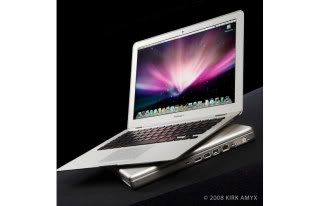
Apple MacBook Air

And there it is, Apple's new toy. Get ready to see heads turn, endless staring sessions, and lot's of broken hearts: Apple's newest MacBook Air.

It's impossible not to look at it without wanting to forget - just for a moment - that our bank accounts don't hang in a delicate balance. This is the new "I want one of those!" flagship.

Technically, nothing truly revolutionary - just that it's the thinnest laptop ever and that it comes with a supersized multitouch capable trackpad.

If on the design department Apple continues to reign supreme, there are already a few issues that have raised some attentions: it has an internal battery that can't be replaced by end-users (unless you like modding and adventures.)
However, this is just like what happens with iPods and iPhones alike - assuming Apple is using high quality batteries (and there's no reason to assume they don't,) you shouldn't need to worry about it for many long years.

The other issue... well... have you seen the 64GB SSD option? It sounds really nice, doesn't it? Considering the extra performance, it would be a match made in heaven... until you learn of the price: an extra $1,300! Ouch!

Well, that's not enough to make me change my mind. I want one, please. And with all the extras! :)

Amazon Store