Showing posts with label Hard drives. Show all posts

Saturday, August 13, 2016

Hackers use hard drive noises as a way to extract information from air gaped computers


In the paranoid world of digital espionage, the holy grail is to be able to infect and extract information from a computer kept disconnected from any network, and now there's a new method to do it using hard drive noises.

Monday, March 14, 2016

WD launches a 314GB PiDrive for the Raspberry Pi


The new Raspberry Pi 3 freed us from having to use a WiFi and/or Bluetooth USB dongle, and for many people all that it was left missing was a hard drive. Well, WD just took care of it, with this 314GB PiDrive.

Wednesday, October 14, 2015

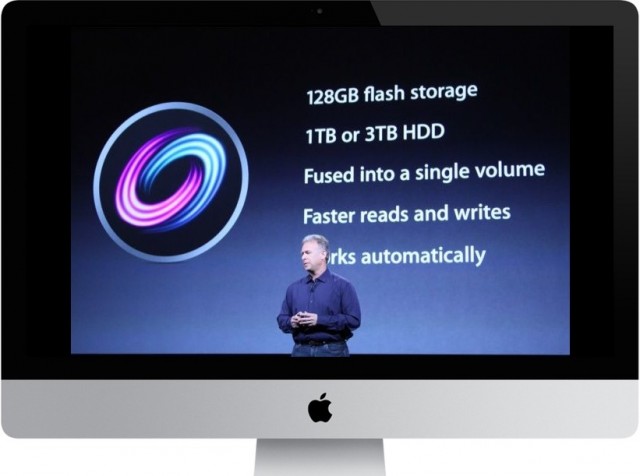
Apple Fusion Drives drops from 128 to just 24GB of flash storage


Apple has unveiled its new iMac line, and besides the improved 4K and 5K resolutions, we also get a cheaper Fusion Drive. Unfortunately, that price cut comes with a significant cut in flash storage as well.

Wednesday, March 12, 2014

LaCie's 1TB Little Big Disk offers over 1GB/s in an external drive


Just the other day we saw some SSDs using the PCIe bus in order to escape the speed limits of the SATA interface. Now, I bring you a device that shows you can also achieve over 1GB/s transfers... using an external hard drive.

As you might imaging this Little Big Disk by LaCie isn't a common external USB hard drive. To achieve this kind of performance, this device uses the latest Thunderbolt 2 - while inside it you'll find a pair of 500GB SSD drives. That's the secret to achieve speeds of up to 1375MB/s allowing to zip through its 1TB of data in under 7 minutes - don't even dare trying to figure out how long it would take for that to happen in a regular USB external drive.

If that's not enough, you can always add a second hard drive and double that transfer rate (provided you have multiple Thunderbolt 2 ports - like in the new Mac Pro). And once you do that, you'll probably never want to look to a computer relying on a regular hard drive - or even a common SSD.

By now you're probably imagining what's the "catch"... and predictably so, it's its price. The Little Big Disk comes with a not so little $1300 price tag (so, roughly about $1 per MB/s transfer). Unless you do need a high-performance external drive, you might be better off paying roughly a third of that and getting two 1TB SSD and using them in RAID 0 for extra speed.

Wednesday, January 22, 2014

What are the most reliable Hard Drives?


Needing to buy an extra hard drive to keep your backups safe? But there are so many... which hard drive should you buy? Well, the guy at the store will try to sell you the one he has on stock; your "computer geek" friends will give you their own opinion (valuable nonetheless) based on the dozens - or even hundreds - of drives they've used along the years; and then... you have companies like Backblaze, using over 25 thousand drives, and sharing their findings with us.


A while back they've shared statistics about how long hard drives kept working in their storage pods - and now they share with us which of the major three brands: Seagate, WD, and Hitachi fares better than the rest. All in all it all boils down to which hard drive should you buy to keep you data safe?

And the answer is Hitachi, closely followed by WD (keep in mind WD has acquired Hitachi's hard drive divison, so, we'll need to see how things evolve) and last - and with much scarier failure rates - Seagate.

While Hitachi hard drives hover around a 1% annual failure rate, WD drives stay at around 3%. Seagate 1.5 and 3TB hard drives on the other hand, have have much higher failure rates (14 and 9%!), Only the 4TB Seagate drive stays relatively competitive with WD drives, but even so it still had double the failure rate of a similar Hitachi 4TB drive.

So... next time you're choosing which hard drive you should buy to keep your digital data safe... who're you going to trust? (Although keep in mind that the usage patterns in a Blackblaze storage pod will not be the same as a domestic scenario - but in any case, if they fare well under such extreme conditions, they're bound to do equally well in a less strenuous environment. And last but not least, you should be be using a SSD as your main hard drive by now, using these magnetic disks as secondary storage for large files and backups only.)

Monday, November 25, 2013

WD Black2 conbines SSD and HDD in a single unit


We all know by now just how great SSDs are, with lightning speeds that make us want to forget the old HDDs. But until we can get a 1TB SSD at the same price as an HDD, traditional hard drives still have its place in our computers. In a desktop computer, we usually have enough physical space to place one (or more) of each, but when it comes to all-in-one PCs and laptops and ultrabooks... things get a bit more complicated. And that's exactly why WD has brought us the WD Black2 Dual Drive, that combines an SSD and HDD in a single unit.

Unlike hybrid drives (SSHD) that use a few gigabytes of flash memory to improve access speeds to frequently used data and show up as a single drive to your operating system, this dual drive has two independent drives inside: a 120GB SSD and a 1TB HDD. So... there's no caching system going on automatically, and it's up to you to use both as you see fit.


The advantages is that you can now have both a speedy SSD and a spacious HDD in your ultrabook using a single drive bay, as this dual drive uses up just the regular 2.5" 9.5mm space as any common laptop drive.

This dual drive WD Black2 has a 5y warranty and can be yours for €299.

Sunday, October 21, 2012

Digital Storage that Lasts "Forever"


We may have written information that has survived thousands of years, and even carved in stone, making it last for "as long as it can" - but when we consider our current digital storage media... things are as long lasting as we'd expect.

Take you regular old writeable CD or DVD discs, have you tried reading one of your first ever recorded discs? You might be surprised that you low cost burnable CDs from 8 or 9 years ago are now completely unreadble (some might have even turned completely transparent!)

And even hard drives and flash memories can last only for so long, usually requiring periodic "data transfers" to newer media, to make sure they're in order and last a few years longer.

For most people this shouldn't be a problem... but if we want our world knowledge to be available for future generations in a long lasting way, we'll need to find a better way to do it. Maybe something like this crystal storage process developed by Hitachi.

A system that is similar to the one used in optical discs (by engraving tiny dots), but that on this crystal lasts virtually "forever" (or a few hundred millions years at least).

Looks like we'll have a way to leave all our knowledge to future generations - let's hope it really is something worth leaving.

Thursday, June 21, 2012

Drobo 5D and Mini with Thunderbolt


If you're looking for a simple way to expand your computer storage capacity, but want to add a bit more security in case of a hard drive failure - while at the same time having some room for future growth - you'll inevitably head towards the Drobos.

And now, we're getting some new Drobos that might get even more attention. For starters, we have the  new Drobo 5D, which as you could probably imply by its name, can carry up to 5 hard drives (3.5" hot-swappable) and comes with USB 3.0 and 2 Thunderbolt ports. You also get a nive little mSata SSD to act a disk accelerator cache to speed things up.

But if you're looking for something a little bit different... I urge you to take a look at this new: Drobo Mini.


Drobo seems to think that people might want to carry their data with them while on the road (and I believe some people do). So, this Drobo Mini is roughly the same size as an external hard drive case, but carries 4 2.5" drives inside, tucked away in spring loaded slots that make changing drives as easy as pushing SD cards into their slots. But don't let its size fool you: you get the same USB 3.0 and 2x Thunderbolt ports as you get in the 5D - and even the SSD cache accelerator! Looks like a winner...

... Now... all they need to be perfect is to have a Gigabit Ethernet port for network access without a computer... :)

[via engadget]

Thursday, March 22, 2012

Seagate Breaks the 1 Terabit per square Inch Barrier


Running low on hard disk space? Not enough storage to keep all your high definition movies and lossless audio collection? Filling up gigabytes with dozens of family videos in HD and 16MP photos in Raw format?

Well, once again, the impossible becomes possible, and Seagate paves the way to even larger hard drives with a new technique that allows them to store over 1Terabit of data per square inch.

What does this mean?

For the immediate future it means we'll be starting to see 6TB 3.5" drives, and 2TB 2.5" drives. But in the future this same technique will allow drives to grow up to 60TB! That should be more than enough for most people... not to mention how much extra space that will mean for companies like Google and Amazon, will all their petabytes of data requirements.

Thursday, November 10, 2011

Partition Master - Free Alternative to Partition Magic


This is the kind of tool that should come as standard in any operating system, but unfortunately still is cause for major headaches whenever you have to deal with it. If you're fond of splitting up your hard drive in different partitions, to keep your OS and applications separate from your data, the tricky question is: how much space should I allocate for it?

A few years back, a few Gigabytes would be more than enough for your OS partition, but ever since Windows started growing, lots of people are finding their "C:" drive to be running dangerously low on disk space. (I have no clue why Windows is taking up so much space, a 20GB partition is now barely large enough to keep Windows and just a couple of other programs installed).

So... when we can do nothing else, we must resort to resizing the disk partition... and find out that we can't actually do it, unless we rely on some other third party application, like Partition Magic - which unfortunately isn't free. But thankfully, there is an alternative partition resizer program that is: Partition Master by EaseUS.


Though it still has more comprehensive paid versions, the free Partition Master is more than capable of doing what we need: resizing partitions without wiping out the current data (though, as always, you should backup the important stuff... just in case!)

It has already saved me from completely wiping and reinstalling Windows systems in more than a couple of times, and I hope you find it just as useful.

Sunday, January 2, 2011

Intel SSD 310 mSATA

The future of local storage is coming... fast. After the SSD modules used by Apple in their new MacBook Air models, here are the new Intel SSD 310. SSD drive modules that ditch the traditional and bulky enclosures (not needed any longer), and use a single PCIe-like connector which is, in fact, a micro SATA connector (mSATA).

This means that, before you know it, your "hard drive" will be pluggable just like a RAM memory module.
Lenovo has already show interest in using these SSD 310 modules - and while they'll only be available to OEMs at the moment; you can expect it to become commonly available in the near future, as board and computer start using this mSATA connectors.

These SSD Intel 310 will cost $99 and $179 (40/80GB) per 1000 units, with performance similar to the current equivalent Intel X25 drives.

Thursday, June 17, 2010

Hitachi Travelstar - Fastest Thinner Laptop HD

It's amazing to see what Hitachi has achieved, building a laptop drive that not only measures 7mm high (almost 50% less than regular laptop hard drives)  but also spins at an incredible 7200rpm and reaches 1,334Mbps max transfer rate over its 3Gbps Sata connection.

With manufacturers always in search for smaller and narrower storage devices for their ultra-thin devices, I guess it won't take long till we see this Hitachi Travelstar Z7K320 (320GB) in consumer devices.

Monday, May 10, 2010

16TB on Small Computer

This is exactly what I need, 16TB of storage space in the size of small form factor computer (and Raid5 to top it off.)

I present you Black Dwarf - a custom-made system with a simple goal: to place as many hard drives - and the computer to run it - in as little space as possible. And the results are truly impressive.


Besides the 8 mais hard drives, it even carries two additional 2.5" drives - which made me think about the possibility to use an SSD as a fast read/write memory cache to make even faster.
Now... if only I had the budget to do it all...

Saturday, April 17, 2010

Drobo FS - NAS at Last

My search for the perfect NAS might now be a little closer to fruition than before. Data Robotics has finally announced the Drobo FS.

With five hard drive bays, this Drobo FS is very similar to the existing models... except for the added (and very needed) gigabit Ethernet port in its back.

With its new dual-core CPU and added RAM acrescida, Data Robotics says we can expect 30-40MB/s transfer rates - and of course, you still the amazing replacing/exchange/expansion capabilities that made the Drobo famous.

Prices start at $699 for an empty Drobo FS... I hope they soon get it under $500, and they'll have a customer for life!

Sunday, February 28, 2010

SSD Tweak Utility

If you're a proud owner of a SSD (Solid State Drive) and want to make the most out of it without going through endless pages of SSD tweaks and doing it one-by-one by hand, here's: SSD Tweak Utility.

With just a couple mouse clicks you'll be able to optimize your Windows for SSD use by enabling/disabling features that were meant to be used with rotating drives.
Things like defragging and indexing no longer make sense in these faster and instant-access SSD drives and are often, counter-productive.

Sunday, December 20, 2009

Upgrade your Laptop drive with an SSD

If you have a new (or aging) laptop and won't stand any longer for the hard drive spinning around while you wait for an application to launch: why not replace it for an SSD?

That's what I convinced one more friend to do, and the chosen model was the 80GB Intel X25-M. If cost is an issue, you can find cheaper models (like the new 64GB Kingston SSDs that show around for under 120 euros.)

If you want a detailed analysis, check out this Anandtech article about the X25-M.


... but it's time to get back to work:


Replacing your laptop hard drive is often just a matter of flipping it over and accessing the hard drive compartment. But as always, in my case, my friend's Sony Vaio forced us to dissamble the case and keyboard in order to gain access to it.


He also took the chance to upgrade to Windows 7. Win7 is the first OS from Microsoft that properly recognizes SSD and configures itself accordingly. Unneeded services like automatic defrag and indexing are automatically disabled (if you're using an older Windows version, be sure to disable it yourself.)
There are also some other advanced issues like partition alignment; but you can google around for it - I'll assume that if you're willing to spend money on an SSD, you'll also be running the latest OS version you can get.

Once installed, you can immediately notice the difference. Booting up the OS takes under 20 seconds. All the tiny pauses we grew accustomed to endure are now gone (making us notice just how much time we had to wait before.)
You can actually continue to work on your laptop while a virus scan or other disk intensive operation is running!

The only issue was that his Sony Vaio comes with two graphic cards: one Intel for "low power operation", and one Nvidia Go 7600 for "performance".) Sony doesn't seem to have Windows 7 64bits drivers... and trying to install either drivers results in failure - so, I'm yet to figure out to solve this issue (and once again leaving me with a really bad impression of Sony.)

But, even with just a generica graphic card, the SSD benefits can be seen and felt at every key stroke, at every mouse click. Thing just "happen" without any delays.
This is indeed one of the things everyone should experience to see the difference.

What about your old hard drive? Well... my suggestion is buying an external USB HDD case (around 10 euros) and using it as a backup drive for your data.


Sunday, November 29, 2009

Memory Card Backups to Portable Disk

Now that we're approaching a new Christmas season and a new New Year, it's time for people to use their digital cameras even more intensively.

That's why we once again have to deal with memory cards and - worst of all - memory cards filled with irreplaceable photos.
So, how do you manage your photos? Do you buy extra memory cards to handle all the shots? Do you carry a laptop around to manage it all?

If none of that works for you: how about acquiring a small portable device that can automatically copy your memory card contents to its internal hard disk?


A device like this Ex-Pro P2S Sata "Picture 2 Drive" allows you to transfer all your photos to its internal 2.5" Sata disk. No more nuying expensive large capacity memory cards, nor carrying your precious laptop around with you at all times.

It handles pretty much every type of memory card out there: Memory Stick (MS) ,MS Duo, MS MagicGate, MS Magic Gate Duo ,MS-ROM, Memory Stick Pro (MS Pro) ,MS Pro Duo, xD Picture Cards (XD).MMC II ,RS MMC, Secure Digital (SD), Secure Digital SDHC (All Cards), miniSD, CF Compact Flash, Microdrive. (E pode ser usado também como USB Card Reader.)

And best of all, it has a very attractive price: on Amazon you can find it for about 40 Euros (device only) or 80 euros with a 250GB hard drive included.

Seems a ve

Thursday, October 22, 2009

Hard disk and Ram Disk Benchmarks

I finally got to benchmark the hard drives in my new PC. (I should have done it, but things keep popping up delaying my "plans.")

Well, here it is now, the disk benchmarks with HDTune.

Both 500GB Seagate disks behave approximately, averaging about 100MB/s transfer rates:


The other 1TB Seagate doesn't stray away from it too much.


Now, I still haven't decide if I go back to using a Raid 0 setup and double the transfer rates; or if I delay it a bit more and then go for a SSD drive... (decisions, decisions...)

Whatever the case, nothing will come close to my 4GB Ram drive:


 3.8GB/s transfer rate and 0ms access time! Now that's how all storage devices should be! :)

Monday, October 19, 2009

SpinRite - Hard Drive Data Recovery

Its incredible how, after so many years, we still have to rely on years old software to analyze and recover data from one of the still most critical computer components ever: the hard drive.

Just a few days ago, one of my own external USB hard drives I use for backup stopped working. 1TB of backup data... that's a lot of data.

That's why I now take this opportunity to tell you about SpinRite.


This amazing piece of software from Steve Gibson digs deep into the lowest hardware levels and does thing that once were considered impossible to do: low level reformating and sector interleave optimization... in a non-destructive way.

If you rely on S.M.A.R.T. to assess your hard drive data quality, you better check this software before you get a nasty surprise.

Thursday, September 3, 2009

Low Cost Petabyte Storage

In a time where I - myself - am still looking for a reliable, simple, and cheap way to keep my data safe (my main computer crashed a few days ago, and I'm still painstakingly slowly recovering data from it) this blog post jumped to my attention: talking about BackBlaze solutions to its large-scale storage needs.

To start with, lets analyze how much a petabytes costs these days (if you don't know what a petabyte is, its 1000 Terabytes, and 1TB equals 1 Gigabyte; to put it in perspective, 1PB equals about 227 thousand DVD-R discs.)
As you can see, the cost difference between the raw hard drives and what most companies charge you is substantial - which is why BackBlaze decided to build their own storage solution (just like Google does) and now shares their secrets with all of us.

The solution they come up with is their BackBlaze PODs, each holding 67TB and costing just $7,687.


The access to all this data is done - not via iSCSI, NFS, SQL, or Fibre Channel - but *exclusively* via HTTPS.

For all the details and a complete hardware and price list for these pods be sure to read the full post on how to build a petabyte storage solution at low cost.


I wouldn't need that many space for myself... but I'm glad they decided to share it with us so we can use some of their ideas. :)

Amazon Store