Showing posts with label Wireless. Show all posts
Thursday, July 27, 2017
Wireless battery-less switch for $9.99
Wish you could place a wireless switch anywhere, to turn on/off any appliance or lamp, but don't want to worry about batteries? Well, check out this Magic Switch that can be yours for less than $10.
Saturday, October 3, 2015
Freevolt pulls electricity out of thin air
Tired of replacing batteries that go out at the worst possible time; tired of recharging devices that should have made us forget the burden of using wired connections? Well, maybe Freevolt will finally be able to help with that, as it can literally pull energy out of thin air.
Thursday, June 5, 2014
Intel says goodbye to cables in 2016
Most people won't imagine going back to the days where getting "connected" meant plugging in a network cable. Our mobile devices made wireless access something we simply take for granted, and Intel is working to make our future truly cable free in the upcoming years: and that means cutting the power cable as well.
Wednesday, March 5, 2014
Build your own wireless charging stand for less than $30
More and more people are falling in love with the added simplicity and comfort of wireless chargers. But sometimes you may not find the exact thing you're looking for. In those cases, maybe you'll be better off building your own wireless charger stand, like my frind André Henriques has done - and has shared with us to prove you can do it at an extremely affordable price.
André bought a micro wireless charger, but it's small size didn't make it easy to place and keep the phone in the right spot. So, he decided to fix it, using a stylish (and low cost) smartphone stand, and placing the wireless charger on it, so it would always be in the right spot and without any chance of the smartphone sliding out of place.
There's a very short item list, and the "do-it-yourself" part is well within reach of anyone who can tape two pieces together. Best of all, the end result looks nice enough to be displayed without embarrassment even in a stylish desktop.
So, here's what you'll need:
- USB power supply (about $5 at DX.com)
- Wireless charger (about $21 at DX.com)
- Acrylic smartphone stand (about $3 at Ebay)
Friday, January 10, 2014
Qi Wireless Charger adapter for any smartphone
People keep asking me about wireless chargers, particularly those without compatible Qi wireless charging devices that wish to cut the last remaining cord that keeps them "tethered". Not everyone has a Nexus, Lumia, or other factory Qi compatible device. In some cases, you can get specific Qi adapters for your smartphone model - particularly in the case of high volume models like the Galaxy S - but if you can't find a suitable Qi back cover or Qi foil for your smartphone, there's one last way to do it.
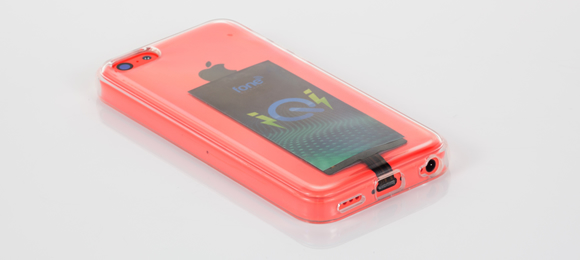
What you'll need is something like this universal Qi adapter that you'll just need to plug into your smartphone micro USB port, and tuck away beneath your phone's back cover (if removable) or hidden behind a smartphone case to keep it from dangling away.
Sure, this means that you'll lose access to your micro USB port - and it won't be practical to plug it in/out constantly. But considering most people already do their data transfers and photo backups using WiFi, and syncing cloud services, that might not even be a real problem.
For me, having gone completely wireless - even for charging - has been a joy. No longer do I have to go through the daily routine of trying to plug the usb cable in the dark, figuring out it must be in the wrong orientation, trying again, figuring out that I was right the first time, etc. etc. Now I just leave it over the charging base and it's done!
I just wished the one's I'm using didn't do such a loud "beep" when it detects a device and starts charging - it's kind of annoying at night (guess I'll have to open them up and figure out a way to make it quieter.)
Tuesday, November 26, 2013
Qi Wireless Charger for iPhone
Just the other day I shared with you just how fond I've become of wireless chargers that you can use with the Nexus 4, 5, 7 and other Qi compatible devices... and how it made me think how even the friendlier lightning cable can be cumbersome on the iPhone. I've looked around trying to find a Qi adapter for the iPhone, but all I found out were ugly and bulky cases. Well... look no more, it seems we're finally about to get exactly what we wanted (at least until Apple decides to make its iPhones and iPads Qi compatible): the iQi mobile for iPhone.
This Indiegogo project uses the same concept as the tiny adapters for some Android devices that stay hidden behind its back covers. It's a very thin and flexible Qi receiver module you can plug into the lightning port and bend backwards, staying hidden behind any flexible iPhone case.
It's a simple yet clever idea, and I wouldn't be surprised for it to be copied by many other makers (as we speak). It costs $25 for the adapter alone, or $50 with a Qi charger (though you can use it with any other Qi charger if you happen to have one already).
Though wireless chargers are less efficient than a cable, I think its worth while... as it provides a truly universal system that gets rid of cables and sockets and such. You simply place your device over a charger and it's done!
The only drawback is that you'll use up the lightning port in your iPhone. For me it's not a big deal, as I only use the lightning cable to charge it up and do all my transfers wirelessly. But if you still use cable sync to iTunes or to get some photos, this iQi charger adapter might become cumbersome to use. You'll have to figure out what you value most for yourself.
Thursday, August 30, 2012
Wireless Electricity is Coming in 2013 - Says Intel
We've grown accustomed to having to plug in our smartphones and other mobile devices whenever they require charging... but truth be told - it's a real pain. Particularly when you have to move away from our carefully planned places where we have the appropriate cables and adapters for each and every device we own. And although microUSB has tried to become a charging standard (and succeeded, to certain extent) there are still devices that require adapters or their own proprietary plugs.
Intel now taunts us, saying that - finally - wireless charging will become a reality in 2013. And let's hope that means a wireless charging becoming a real standard, rather than those odd wireless chargers some brands have been offering as "options". (Who can imagine a future where each device will require each own, specific, wireless charger... that would be really insane!)
So... in 2013, we might begin to charge our smartphones simply by placing them next to a laptop, or other wirells charger device, and I hope that also means larger area charging mats that we can place on (or even under) our desks and tables, so everything can be kept charged just by placing the devices there.
Monday, January 5, 2009
Wireless Bluetooth Webcam
I'm surprised no on had thought of this before, but apparently this BT-1 webcam from Ecamm is the first to use bluetooth for wireless video transmission.
And just because it needs no wires, don't think it can't handle decent quality content, as it can stream 640x480 H.264 video with 48 kHz AAC stereo audio for 4 hours between charges.
As always, you can't expect this sort of stuff to come cheap: $150.
But, if you really can't stand wires running across your desktop, I'm sure you'll find a way to justify it. :)
Saturday, August 23, 2008
Wireless Electricity
One of the last barriers keeping us from living a truly wireless life is about to smashed: wireless electricity!
That's right, we'll soon be able to kiss those dreaded power cables goodbye.
And while many companies have promissed that (and failed to deliver) I think this time it may be different, because it's none other than Intel itself saying it!
Intel has shown that it could transmit electricity wirelessly over a dozen inches with 75% efficiency (previous systems were only able to achieve 50% efficiency at best.)
So, it really seems we may have some cablefree gagdgets in the near future afterall.
Saturday, July 19, 2008
TransferJet - Short Range High Speed Transfers
Tired of shuffling through WiFi, Bluetooth, Wireless USB, WiMax, WiBree and all other kinds of wireless systems? Well, get ready to handle a new one: TransferJet.
Promissing speeds up to 560MBps in short (3cm) ranges, this protocol would be suitable for large quantities of data like photos, music and video, from cellphones, digital cameras, and media players.
Well, at least they have a impressive supporters list: Canon, Kodak, Hitachi, Matsushita, Nikon, Olympus, Pioneer, Samsung, Toshiba, and Sony.
Just see how this turns out; if it does become a standard, or if it ends up being one more of those "standards" that just ends up screwing customers.
(kind of like all the different "standard" memory cards out there)
via [Engadget]
Thursday, January 10, 2008
Wireless Self-Powered Switches
Wireless switches are nothing new; they've been used for ages. Being able to place a switch anywhere you want without drilling holes in your walls and routing cables is quite appealing. More so, if you don't like the switch where it currently is, you can just detach it and place it somewhere else - so it's not covered by your new furniture, for instance.However, until recently, they all had one major flaw: batteries.
I don't know about you, but I really hate batteries. It's more the certain that the battery will run dry in the worst possible moment - probably just as you were about to throw a party, leaving you in dark.
So, can't we fix this issue once and for all?
Yes you can: with wireless self-powered switches!
There's no "but" attached, it really works as advertised, using an ingenious system.
EnOcean is a company specialized in self-powered devices (the kind all devices should be) and holds lots of patents in the field.
When it comes to wireless switches, they were able to generate enough energy to transmit the status change by the "flicking" of the switch movement alone! Really amazing, isn't it?
Don't expect to use WiFi, ZigBee or Bluetooth though. The minute amount of energy available forced to use a proprietary protocol which allows them to transmit the data three times (for reliability) and possibly more if there's still enough energy left to try further retransmissions.
It's not quite wireless electricity, but it's definitely a step in the right direction.
Labels:
EnOcean,
Home Automation,
Self-Powered,
Switches,
Wireless
Subscribe to:
Posts (Atom)