Showing posts with label Browsers. Show all posts

Thursday, January 12, 2017

Opera Neon browser


The browser is currently the number one tool you couldn't do without on any computer, but there's still room for change, and Opera shows us its vision for the future with the Opera Neon.

Friday, November 25, 2016

Vivaldi can light up your web browsing using Philips Hue lamps


If you're a fan of Philips Ambilight system on TVs, now you can do something similar for your entire room as you browse the web using Vivaldi and some Philips Hue lamps.

Saturday, May 14, 2016

Opera gets Power Saving mode


Opera has introduced yet another new feature, a Power Saving mode, and it may help you extend you laptop battery life for several hours.

Thursday, February 25, 2016

Fluid Browser for Macs turns web and videos into a transparent floating window


Our computers are powerful machines, but they sometimes lack some basic features when it comes to multitasking. This Fluid Browser will help you watch things on the web while doing other stuff.

Monday, September 21, 2015

Small URL can crash Chrome


If you use Chrome, you better beware. There's a small url that can crash your browser not only if you click on it, but also crash your tabs should you simply hover over it without clicking.

Tuesday, September 8, 2015

AdBlock Browser available on iOS

After launching as beta for Android, the Adblock Browser is finally available for iOS as well - though it comes at a time when we're about to get iOS9, which will provide ways to attack adblocking plugins to Safari.

Thursday, June 11, 2015

iOS 9 will allow adblockers on Safari


Apple keeps reminding people it takes privacy really seriously, and that - unlike Google - it doesn't make money by tracking users preferences; and with iOS 9 it seems it will give another step to prove it: by making it very easy to add ad blockers to Safari on the iOS.

Friday, June 5, 2015

Chrome will start to suspend unimportant Flash content to improve battery life


Flash and other plugins have become less and less important in the modern web, and now Google thinks it's time to take another step away from it, by suspending all plugin content deemed non-important... and improving performance and battery life in the process.

Thursday, April 23, 2015

How to disable Chrome's new Bookmark cards


The latest version of Chrome has come with the new "card style" bookmark system that Google announced a few monthgs ago - and as with any change, not all will be pleased with it. But thankfully, you can (still) go back to the way things were before

Friday, April 17, 2015

New Chrome for iOS gets widgets and extensions


If you felt no browser ever stood a chance of standing up to Safari on iOS, then it's time you give Chrome another chance. The latest version adds widgets and iOS extensions support, making it better than ever... and with a few nice details, the kind Apple used to be proud of.

Thursday, December 11, 2014

Project Maelstrom is a BitTorrent powered browser for the free web of the future


Torrents may still be mostly associated with illegal content, but that's just a portion of a much larger and wider reaching issue. In fact, BitTorrent is going to great lengths to change that image and show how it can be the payday for authors; and now goes even further with this Project Maelstrom, a torrent powered browser for a free and decentralized web.

Friday, January 24, 2014

Microsoft strolls down memory lane to promote IE to the children of the 90's


Looks like giant software companies fall prey to the same nostalgia that afflicts people when they approach their forties. To promote their IE11 browser, Microsoft has decided to target the 80's and 90's generation with a very nostalgic video called "Child of the 90's".

Even if they might have their own agenda, trying to make parents use IE11 so it might "rub off" to their children, the truth is that it doesn't really matter which browser you use or will use after this clip in order to appreciate it: Yo-yo's, walkmans, tamagotchis, floppy disks, modems - you name it!

Sure, I feel kind of scared knowing that most younger people will look at this the same way I looked at things from the 60's - but hey, just you wait for it, give it 20 or 30 years and Justine Bieber and One Direction will be "those guys old people like"! :)

The only difference is that while we had 14Kbaud modems and 720Kb floppys, they'll might be able to joke around about how ridiculous it was to have just 50GB blurays and 1Gbit internet. (And hopefully, by then we won't have to complain about mobile devices battery life only barely making it to the end of the day.)

Monday, September 9, 2013

Opera Coast browser for iPad and iPad mini


There's still a lot to be done when it comes to apps taking full advantage of tablet devices. If you have an iPad or iPad mini, then you're in luck. Opera has just launched its new Opera Coast browser. A browser that has turned to iOS itself for inspiration and that makes browsing a lot closer to using any iOS app.

When you launch Coast, you'll face a screen that closely mimics any iOS home screen: a clean page with several web page icons (that you can rearrange just like you would on your iOS main screen). When you open on any site you get a full-screen browsing experience - once again akin to opening up any app. These similarities are no accident. Opera's intention is precisely to present you the web just as if it were an extension of your native apps... and the result is rather good.

Now, I just wish they won't take long to bring an Android version of this Opera Coast, because Android is desperately in need of good tablet apps - and such an app would arrive at the best possible moment, with millions flocking around the new Nexus 7. And unlike the iOS version, in Android Opera is free to use the HTML/javascript/rendering engine they want instead of being forced to use Safari. Can't wait to try it out.

Friday, May 24, 2013

Chrome 28 gains Richer System Notifications


The upcoming Chrome 28 will not only be the first Chrome using the new Blink engine - leaving behind the long time collaboration with WebKit - but will also mark the beginning of a new era for web apps and web services with richer notification capabilities that can popup even if you're not running Chrome.

These new notification will show up in a notification center on Windows and Chrome OS, allowing you quickly scan through what happened even when you've been away from the computer, and just like the notifications on Android, you can initiate actions immediately (like answering an email) from there. Being on a separate notification center also means they'll keep showing even if you have no open Chrome window.

Similarities with Android notifications don't stop there, as you can also get exactly the same kind of notifications: like image previews, or collapsible and aggregating notifications that combine multiple notifications into a single item.

Of course, you'll be able to select which notifications to receive and their priority, so your life doesn't end up being ruled by the popping up of notifications all the time. If can't wait to try this out, you can get it right now, using Chrome Beta.

Wednesday, March 6, 2013

MS to Pay 561 Millions to Europe for Lack of Browser Choice


The European Comission has fined Microsoft in 561 million euros for not fulfilling what they agreed to in regards of browser choice in Windows. MS had been found guilty of abusing its dominant position to force their own Internet Explorer browser onto users. They agreed they would show up a browser choice screen to european customers, so everyone could choose their preferred browser, for five years (until 2014).

However the EC has found that from May 2011 to July 2012, Microsoft failed to do so in the Windows 7 SP1, leaving 15 million european users without that browser choice screen. I think it would be far more important to educate users so they know they have alternatives, without being required to have them shoved in our faces as morons. Likewise, if the EC is so worried about the lack of browser choice, why don't they worry about far more closed platforms, as Apple's iOS, where competing browsers don't even get the chance to provide a real alternative (they can't even access the full Safari javascript performance!) Wouldn't that deserve the same treatment as the one given to MS?

In any case, I'm not fond of Internet Explorer, particularly when recently I found I couldn't even use it to download Google's Chrome browser. When headed to the main chrome page, clicking the download button... did nothing at all. I had to search around in secondary pages till finally founding a real link that worked. Maybe the problem is Internet Explorer, maybe it's Google's script for the button click action; the scary part is that something as simple as downloading a file has now become so complex that we're not even sure we can do it. And that's... very wrong and worrying.

Sunday, February 17, 2013

How to Turn your Browser into a Notebook

Imagine you're so used to being inside your browser, that you don't even want to open another app to write something up quickly... Wouldn't it be great if you could do it inside your browser? Well... you actually can, thanks to the magic of HTML.


You just need to type the following into your browser address bar:
  • data:text/html, <html contenteditable>
This will open up a black page that you can use to write whatever you wish, making it the ideal note-taking place for everyone who spends most of their time shuffling through browser tabs. Just keep in mind that if you close the browser (or this tab) you'll lose whatever you had written in there - so, don't treat is as a real note taking alternative if you want to save it for later.

But, for quick notes or to act as a scrap clipboard where you copy paste stuff, it's more than adequate, and you can easily keep it handy by marking it as a favorite.

Tuesday, July 31, 2012

Google Chrome gets Webcam and Mic Access


The latest Google Chrome.is now available for download/update, and it brings the much awaited webcamm and microphone web support without the need for 3rd party plugins (like Flash). This allows any webpage to directly access your computer's webcam and microphone, after you give it your permission (you wouldn't want anyone to access it without your consent, would you?).

This is the first step into making WebRTC possible - meaning, high quality video and audio real time communication over the internet possible... without anything else but a common browser.


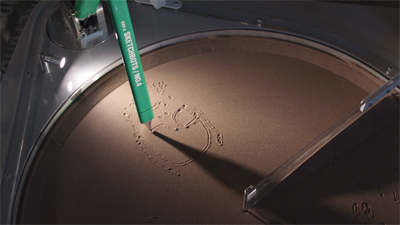
To try it out Google suggests several sites, like Webcam Toy and Sketchbots. This last one will take your picture and have a robot draw your sketch on sand - with live streaming video via YouTube.

Other than this, the new Chrome also has better support for gamepads, support for high-density screens like the new MacBook Pro Retina display, and better Cloud Print support.

Wednesday, February 8, 2012

Google Chrome for Android

Yes, it's still tagged "beta". Yes, it's still only available for Android 4.0 devices. But, who cares... Google Chrome is finally available for Android!

Considering that the current Android browser is kind of a let-down, even when running on a speedy quad-core Tegra 3 like the one equipping the new Transformer Prime (if you don't think so, just try and work a bit on Google's own Google Docs spreadsheets - when requesting the full "desktop" experience), I've been saying that what Android really needs is a decent - desktop-like -  Chrome browser. And now... here it is.

I still haven't had a chance to test it myself, my Transformer Prime review unit is already on its way back, sadly, but I can't wait to try it and see if those odd behaviors and inexplicable delays are now gone.

If that's the case, as I expect it to be, then will make even more sense to consider merging the Chrome OS project with a Android Chrome OS... as it eventually become one and the same - even is spanning across different platforms (ARM, x86, etc.)

Get your Chrome for Android on Android Market.

Wednesday, January 4, 2012

Knowtilus - The Talking Browser for iOS


If you're tired of wasting time with Safari in your iPhone or iPad and wish there was a simpler way to translate foreign content web pages and do things like... making your iPhone read a web page aloud; then you need to check this Knowtilus.

For starters, it can easily translate and read you any webpage, in dozens of supported languages!

But there's more:  there's a reader mode, RSS feed support, translator (like previsouly said) offline articles for later reading, sharing via social networks, QR scanner, writing tool, and even the ability to sketch over any webpage!


It sure could use a major revamp on its interface, which can be quite cumbersome at times... But if you value "value" over "beauty", then you'll want to give it a try (and be sure to check their help videos to see all you can do with it.)

Monday, October 3, 2011

Facial Animation using WebGL


Here's another great "experiment" that shows us just how capable modern browsers can be and what can be achieved with HTML, Javascript - and best of all - WebGL. In this demo you tweak a 3D CGI head facial expressions as much as you want.

... Though I find this example to be impressive as it is; just imagine what this kind of technology will be able to do with a few more years of improvement and development. Do you still think it will be "impossible" to create Pixar-quality animations designed entirely within your web broser?... I wouldn't be so sure, and the proof that it will be possible one day is right here, right now! :)


http://www.chromeexperiments.com/detail/ginger-facial-rigging/

Amazon Store