Showing posts with label Bugs. Show all posts
Friday, May 26, 2017
NTFS bug allows sites to crash Windows 7/8.1 computers
Visiting a malicious Web site can crash computers with Windows or 8.1, with a simple reference to a special system file name.
Wednesday, November 23, 2016
Video crashes iPhones and requires hard reset
There a seemingly unsuspecting video circulating around the web that can slow down iPhone to a crawl and require a hard reset to get back to working order.
Friday, November 11, 2016
iOS bug allows repeated calling of a number as you press a link
I know it will be hard to stay clear from this one, but there's a bug on iOS that allows an attacker to repeatedly call a number from your iPhone with little chance of you stopping it in time.
Wednesday, June 1, 2016
Surface Book "Sleep of Death" keeps it from waking up properly
Looks like the infamous "Blue Screen of Death" might soon give way to a newer phenomena plaguing Microsoft's flasgship Surface Book: the Sleep of Death.
Friday, March 11, 2016
Asus ZenFone 2 bug silently eats away your free space
If you have a Asus ZenFone 2 smartphone and have the strange feeling that its free space is disappearing, it's not just your imagination; it actually is and it's not your fault: there's a bug slowly eating away all the available free space.
Saturday, February 13, 2016
Jan 1 1970 can brick your iPhone
If you thought the previous date bugs on iOS were nasty, how do you feel about the latest one, where setting the date to Jan 1st 1970 can brick your iPhone?
Wednesday, January 27, 2016
Safari is crashing worldwide for iOS and Mac users
If you're a Safari user, you may find that your browser is practically unusable today, crashing constantly. But don't start messing around with your computer, the problem is on Apple's side.
Monday, September 21, 2015
Small URL can crash Chrome
If you use Chrome, you better beware. There's a small url that can crash your browser not only if you click on it, but also crash your tabs should you simply hover over it without clicking.
Tuesday, July 14, 2015
How to fix Play Store on Sony Xperia smartphones
If you've just bought a Sony Xperia smartphone and found thay your Play Store is blank, it's not your fault. This is a known bug, and thankfully there's a way around it.
Friday, February 8, 2013
Facebook Error Takes Down Most of the Internet
I think it would be appropriate to cue in the Twilight intro theme, with the "do not adjust your TV set" - but I suspect most of younger people would have never heard it before. Yesterday millions of users worldwide might have been puzzled when, visiting their usual websites, they ended up in a Facebook page showing an error.
The problem was caused by the fact that most sites use a small Facebook script to allow visitors to "like" and "share" their products and news on Facebook, but somehow Facebook did something wrong that caused most sites (every one?) using it to redirect theirs users to a strange Facebook page. In my own case, I was redirected this Facebook error page when trying to access a YouTube channel page - so you might understand just how odd it was.
Facebook quickly fixed the issue (I can imagine all the alarms going off in there as they saw millions of accesses to that error page) but that prompts us to imagine just how vulnerable the entire internet may be if some malevolent hackers, by any chance, could inject their code using this method and having their nasty script nearly instantaneously placed on millions on computers that would be browsing legitimate sites.
Wouldn't that be something to really worry about?
Thursday, December 20, 2012
How to Fix iOS 6 WiFi Unable to Join bug
Ever since I updated my iPhones to iOS 6 I was experiencing a very strange thing: all iOS 6 iPhones failed to connect to my main WiFi hotspot. An hotspot that had been working just fine for years, without any hint of trouble, and that still worked perfectly... provided you tried it with a iOS5 device.
However, as I have two other hotspots at home, one acting as a repeater, another as a separate network, and both were working fine (yes, I was able to connect to a repeater but not the the primary hotspot) never worried about it too much.
But yesterday, with the iOS 6.0.2 update promising to fix WiFi bugs, I hoped that it would finally take care of it... but it didn't. But then, one of my most regular readers pointed me to a post that talked about an identical problem... and how they were able to fix the problem by simply typing the wifi network name manually!
Could it be that simple?
I actually had never tried that, because all my WiFi SSID's showed just fine and in full strength. But, although it connected fine to my other 2 WiFi networks, there was the "one" that always ended up in a "unable to join" error.
Well... no harm in trying. And... it actually did the trick! I was able to connect to the elusive WiFi network I had been unable to connect to for months (since the iOS 6 update).
Although this doesn't seem to be a widespread or common bug, if you ever face the same weird unable to join errors in a specific WiFi network, be sure to try and enter its name manually. You never know that might be it - as it was in this case.
However, as I have two other hotspots at home, one acting as a repeater, another as a separate network, and both were working fine (yes, I was able to connect to a repeater but not the the primary hotspot) never worried about it too much.
But yesterday, with the iOS 6.0.2 update promising to fix WiFi bugs, I hoped that it would finally take care of it... but it didn't. But then, one of my most regular readers pointed me to a post that talked about an identical problem... and how they were able to fix the problem by simply typing the wifi network name manually!
Could it be that simple?
I actually had never tried that, because all my WiFi SSID's showed just fine and in full strength. But, although it connected fine to my other 2 WiFi networks, there was the "one" that always ended up in a "unable to join" error.
Well... no harm in trying. And... it actually did the trick! I was able to connect to the elusive WiFi network I had been unable to connect to for months (since the iOS 6 update).
Although this doesn't seem to be a widespread or common bug, if you ever face the same weird unable to join errors in a specific WiFi network, be sure to try and enter its name manually. You never know that might be it - as it was in this case.
Tuesday, October 23, 2012
iPhone 5 Keyboard Glitch will be Fixed in iOS 6.0.1
Have you bought a new iPhone 5, but are going crazy with the weird glitches that sometime occur in its keyboard, with lines being "scratched" over the keyboard?
Well, you're not crazy, and now it seems that Apple has finally acknowledged the issue and promises a fix will come in iOS 6.0.1. At least that indicates that it's not an hardware issue (which would also be strange, as this happens just in some particular cases).
Most of the time these glitches occur when you're trying to install a new app on the App Store and the password request box pops up - causing those shimmering lines all over the keyboard.
Although it's nice to know that Apple has figured it out and promises the fix will come soon, I can't help but wonder how they didn't noticed it before launching the final iOS 6 version to the public? Surely they have tried installing apps on the iPhone 5, right?
Well... as with all other bug fixes: better late than never!
Tuesday, October 2, 2012
How to Fix Contacts Bug in iOS/iPhone
If you recall the weird bug I've been complaining about since I upgraded my iPhone to iOS 5 and iCloud, that made some of my contacts show up as "numbers" instead of by name - just like in the ancient times of the cellphone era - and that, sadly, has survived even to the new iOS 6 upgrade and change of iPhone... you might want to know that... I've finally solved it!
You might want to think for a minute just how annoying it is to have some friend call you or message you, and instead of his name (that you have saved in your contact list) you get to see just some cryptic numbers.
The "workaround" I've been using involved calling the number, just for an instante, and cancelling it... because during the calling period, the contact name did show up in the iPhone screen!
But, just like the very few other persons complaining about in Apple's Support forums... we were too fre to even be noticed.
Thankfully, someone decided to share the thing that solved the issue for him. He suggested I should try enabling the iCloud contacts sync - because that did the trick for him.
Well, in my case that option was already enabled, and so - once again - my hope of fixing it was tumbling down fast. But, in any case... nothing like trying the good olf flick of the switch, and so i turned off the iCloud contacts sync and on again.
All the recent calls and messages that showed up as "numbers" now showed up the contacts name, as intended.
If you're suffering from the same issue, I hope this might fix it for you as well!
You might want to think for a minute just how annoying it is to have some friend call you or message you, and instead of his name (that you have saved in your contact list) you get to see just some cryptic numbers.
The "workaround" I've been using involved calling the number, just for an instante, and cancelling it... because during the calling period, the contact name did show up in the iPhone screen!
But, just like the very few other persons complaining about in Apple's Support forums... we were too fre to even be noticed.
Thankfully, someone decided to share the thing that solved the issue for him. He suggested I should try enabling the iCloud contacts sync - because that did the trick for him.
Well, in my case that option was already enabled, and so - once again - my hope of fixing it was tumbling down fast. But, in any case... nothing like trying the good olf flick of the switch, and so i turned off the iCloud contacts sync and on again.
All the recent calls and messages that showed up as "numbers" now showed up the contacts name, as intended.
If you're suffering from the same issue, I hope this might fix it for you as well!
Thursday, September 20, 2012
iOS6 WiFi Drops Out and Apple Login Shows Up
The new iOS6 may come with hundreds of improvements, but it also comes with a very annoying bug: just after installing the new iOS6, and as I was checking that everything was working as it should, as soon as I made the mistake of checking the new App Store, my iPhone 4S suddenly went into berserk mode, dropping out of my WiFi network, and popping up some sort of Apple web login page (that shows a page not found error).
No matter what I do to try and get it to "stay" on either of my WiFi networks, it jumps out just a couple of seconds after being connected. I was going crazy, rebooting my routers, checking the wifi settings, etc... until a cry for help on twitter quickly revealed a lot of my friends was also having the exact same problem.
Maybe this is just a glitch caused by overloaded servers in Apple's Data centers... but it certainly is annoying as well, and.. as there are dozend and dozens of pending App updates, I'm not afraid some of them have already been done via cellular and not over wifi.
If anyone finds a fix for this issue, please to let me know.
Update: seems like that there's nothing we can do on our side, just got a tweet saying: "Apple’s WISPR captive portal (i.e. coffee shop internet) check page is broken. Not iOS 6 related. Apple needs to fix the page."
Wednesday, September 19, 2012
Android Forgets pre-1970 Birthdays
A friend of mine (@jcpandrade) just sent me a strange report that indicates that at least some Android devices might be forgetting the birthdays for people born before 1970. His report follows:
I've beem using Outlook's and MS Exchange calendar for years, as well as its contacts. So, I usually keep their birth dates in the correspondent contact field, and Outlook takes care of creating a recurring yearly event for the birthday. It's a simple "all day" event, repeating every year. And that way, I can easily keep tabs on who's birthday is coming.
However, on my Optimus Madrid (a gingerbread Android smartphone), synced via Exchange corporate account, I found out that I had no birthday event for everyone born before 1-1-1970! (EPOCH).
But there's more: if I create a recurring yearly event starting on January 1st, 1970... it shows up fine. But if you edit it to begin on Dec 31st 1969... Android keeps it on the original Jan 1st date!
I've found that this happens in more devices as well, as I verified the same behavior in a Nexus S (Android 4.0) and Samsung Galaxy S2. On an iPhone 3GS, there's no such issue and the events work up as expected.
A really weird case indeed. But if you happen to have MS exchange synced birthdays on your Android, you might want to verify if everything is working as expected... or risk forgetting someone's birthday... if he or she's over 42!
I've beem using Outlook's and MS Exchange calendar for years, as well as its contacts. So, I usually keep their birth dates in the correspondent contact field, and Outlook takes care of creating a recurring yearly event for the birthday. It's a simple "all day" event, repeating every year. And that way, I can easily keep tabs on who's birthday is coming.
However, on my Optimus Madrid (a gingerbread Android smartphone), synced via Exchange corporate account, I found out that I had no birthday event for everyone born before 1-1-1970! (EPOCH).
But there's more: if I create a recurring yearly event starting on January 1st, 1970... it shows up fine. But if you edit it to begin on Dec 31st 1969... Android keeps it on the original Jan 1st date!
I've found that this happens in more devices as well, as I verified the same behavior in a Nexus S (Android 4.0) and Samsung Galaxy S2. On an iPhone 3GS, there's no such issue and the events work up as expected.
A really weird case indeed. But if you happen to have MS exchange synced birthdays on your Android, you might want to verify if everything is working as expected... or risk forgetting someone's birthday... if he or she's over 42!
Tuesday, July 3, 2012
How to Fix Chrome Blank Page Search Results
If you're used to having your Chrome serving you your search results instantly as you type, you might find it very strange to suddenly have your Chrome showing up no Google search results at all. There's a bug that is sending Chrome user to a blank page (blank.html) - and that, although Google claims is "sort of fixed" for most users... is still plaguing a few unlucky ones.
So, if you're one of those unlucky few, here's a temporary fix that might you help you keep your sanity:
Problem: When submitting a search with in the address bar (Omnibox) in Chrome, you are automatically redirected to a blank page and no results are displayed.
Solution: Click the wrench icon and navigate to “Settings.” Under the Search section, click “Manage Search Engines” and do the following:
- Create an alternative Google search option from Other Search Engines (call it Google2 or something), but in the URL section type “https://www.google.com/search?q=%s”
- Make the new Google option the default option, ensuring that the old identifier still exists.
- Use this option until Google fixes the issue (we will update you when it does), it will restore all the functionality of the Omnibox and other features that the temporary solution doesn’t provide.
[via thenextweb]
Wednesday, April 4, 2012
How to Fix Forza 4 Marketplace Error
If you're an avid racing fan and have an Xbox 360, then you'll know Forza 4 inside and out by now. This amazing racing game puts you behind the wheel of cars of all makes and models, from cheap every day cars to the most exclusive and unaforddable ones.
Even better, every month a new expansion pack comes out, offering even more cars (if you have a season pass, you can get most of them for free).
Usually, the process is quite simple: as you enter the game you'll receive a message that there's new content available, you head up to the Forza Marketplace, select it... and it's done.
However, sometime you might get the following message instead:
MARKETPLACE ERROR Failed to download required marketplace data
And no matter how hard you try, you can't get past it and gain access to the new packs.
Considering the new April Alpinestar pack is out today, some of you might be getting severely frustrated if you face this error.
Well, it seems there is an easy fix, provided by Turn10 studios themselves:
- Delete season pass -> go to HDD -> games and applications > Forza 4 -> delete season pass
- Delete season pass -> go to HDD > clear cache
- Start up the game and re-download the season pass. You should be promoted to download it again automatically
- If not then access the marketplace section of the game and download it manually
- Once that has downloaded it should start the content download automatically
[Update: thought that was the end of it, but with the May Top Gear Pack the problem is back... and now it doesn't work even with this technique!]
Wednesday, March 21, 2012
iOS Waiting Apps Bug
The latest iOS 5.1 was eagerly expected by thousands of iPhone 4S users that have been living a nightmare with poor battery performance, frequent network dropouts, and the dreaded Invalid SIM issue. For the most part, the latest iOS did fix most of it - although some friends, that never had any issue, are now reporting severely degraded autonomy, even in older 3GS models... which prompts me to believe there are still things left to be done.
Things like the one that I'm writing to you about today, and that - as it affects the most elemental corner stone of the whole iOS experience... it's something that I think Apple shouldn't be allowed to toy with as it seems to be doing.
I'm referring to App updates and installs from the App Store.
Ever since the iPhone first got push notifications that I complained about why wouldn't Apple notify us of available App updates? Indeed, some rare odd times it seemed to do that, but for the most part you were left with the task of manually visiting App store to see if there were any updates... which was kind of annoying.
Well, in the past few day, it seems that Apple finally got to do what I've always wished for, and every day I was waking up to an iPhone with the App Store icon stating how many App updates were available: great!
Unfortunately, that feeling didn't last long... because as soon as I tried to update any app, it got stuck in a "waiting" state...
Trying to toggle it to pause/loading had no effect... the updating or installing Apps just sit there... waiting for "something"... After several attempts I did figure out that given enough time, they eventually install/update. (I now install the updates only before going to bed, so that by morning - hopefully - it's done.)
The worst part is not even that we're unable to use the "waiting" Apps (which can be annoying if it happens to be an App you really need to use), but the fact that there seems to be no logic to what that waiting thing will stop waiting and start downloading as I was able to find out when, after several hours with updating Apps stuck in waiting mode while I was in WiFi range... they finally decide to begin downloading after I got out and was using my 3G data plan - wasting several dozen MBs of my tiny data plan that is barely enough for my regular use.
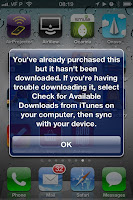
Sure... I guess Apple is preparing some new stuff... like automatic updates during the night (would make sense to be doing that when doing the iCloud backup)... But that's no excuse to leave users hanging out with Apps stuck in "waiting" mode. After all, isn't iOS all about "user-friendly" and stuff?And I won't even go into those dreaded downloading App issues that prompt you to sync from your computer iTunes! I stopped using iTunes the moment iOS 5 came out, and will never want to hear about iTunes again! So... stop prompting me to use it and fix whatever's wrong so that I can download the Apps from the iPhone.
Nor will I let those "phantom Apps" that sometimes briefly prompt error messages regarding "this App and 25 others could not be downloaded"... when it's referring to Apps that I have deleted ages ago, and their Icons reappear... but disappear again once you try clicking on it.
C'mon Apple... these are the kind of bugs no one can forgive from the guys that brought us the "App Store"...
Friday, December 16, 2011
How to Fix Invalid SIM problem in iPhone 4S
After nearly a month of suffering with Invalid SIM problems and lost network connection on my iPhone 4S, Apple has finally revealed a fix.
There's a new iOS 5.0.1 (9A406) - don't know why Apple chose not to change the version number to make it simpler for everyone to get it fixed once and for all - and the procedure to fix the iPhone 4S Invalid Sim problem is described in TS4148.
Symptoms
In certain situations, iPhone 4S may have difficulty recognizing a micro-SIM card, resulting in the following behaviors:
- "Invalid SIM" or "No SIM Card installed" alert appears intermittently.
- Status bar displays "No Service" or "Searching" in a location with good network coverage.
Products Affected
- iPhone 4S
Resolution
If you encounter any of the above symptoms on your iPhone 4S, follow the steps below.
Note: These steps are necessary only if you are experiencing these symptoms on an iPhone 4S.
- Back up your user content and settings using iTunes or iCloud.
- Restore your iPhone 4S using iTunes.
After the process is complete, restore your user content and settings from your backup.
To confirm that you've successfully restored, verify that the version is now iOS 5.0.1 (9A406) in Settings > General > About.
Wednesday, November 2, 2011
How to Fix iPhone 4S Poor Battery Life
The new iPhone 4S may be the best iPhone ever but... unfortunately it has also been in the news due to undesirable issues: such as its poor battery life.
I was just one of the many people that noticed a drastically reduced battery life going from my previous iPhone 4 to the new 4S... and wasn't very happy about it. I was used to getting a full day of averagy/intensive use out of my iPhone... and with the new 4S, I couldn't even get to the end of the afternoon without reaching the critical red stage (below 20%).
Sure, I have "everything" enabled: 3G, location services, bluetooth... and I planned on keeping it that way.
I also tried some of the tips: disabling the location services for the ads, timezone adjustment, etc. But it made no difference at all.
So, a few days back I decided to go old school and simply perform a complete discharge/charge cycle - also called "battery recalibration" - as it allows the charging/monitoring circuits to better measure the battery level.
I noticed something might be off, as i quickly got to the 20% mark... and to the 10%... but the iPhone 4S just kept going and going... one hour... two hours... and so on... until a few hours later - at last - the iPhone 4S finally shut itself off. Meaning... the last 20% took almost as much time to deplete as the previous "80%".
It seemed I was on to something...
I left my iPhone 4S charging overnight, and the next day my new iPhone 4S discharge rate was finally similar to what I was used to on my iPhone 4. Going through the day without a hitch.
Now, a few days later, the iPhone 4S keeps behaving just as I would expect - and no longer showing me low battery warnings in the afternoon.
Considering it won't cost you anything to try it: I strongly suggest you do the same if you're facing the same abnormal "low battery" warning. It might simply be just a erroneous battery level measurement!
I was just one of the many people that noticed a drastically reduced battery life going from my previous iPhone 4 to the new 4S... and wasn't very happy about it. I was used to getting a full day of averagy/intensive use out of my iPhone... and with the new 4S, I couldn't even get to the end of the afternoon without reaching the critical red stage (below 20%).
Sure, I have "everything" enabled: 3G, location services, bluetooth... and I planned on keeping it that way.
I also tried some of the tips: disabling the location services for the ads, timezone adjustment, etc. But it made no difference at all.
So, a few days back I decided to go old school and simply perform a complete discharge/charge cycle - also called "battery recalibration" - as it allows the charging/monitoring circuits to better measure the battery level.
I noticed something might be off, as i quickly got to the 20% mark... and to the 10%... but the iPhone 4S just kept going and going... one hour... two hours... and so on... until a few hours later - at last - the iPhone 4S finally shut itself off. Meaning... the last 20% took almost as much time to deplete as the previous "80%".
It seemed I was on to something...
I left my iPhone 4S charging overnight, and the next day my new iPhone 4S discharge rate was finally similar to what I was used to on my iPhone 4. Going through the day without a hitch.
Now, a few days later, the iPhone 4S keeps behaving just as I would expect - and no longer showing me low battery warnings in the afternoon.
Considering it won't cost you anything to try it: I strongly suggest you do the same if you're facing the same abnormal "low battery" warning. It might simply be just a erroneous battery level measurement!
Subscribe to:
Posts (Atom)


.jpg)

