In this day and age, most photographs you'll come in contact with will most likely be "digital photos".
And, with the ever improving photo-editing software, detecting if a photo is "real" or "edited" is becoming increasingly difficult.
...That's why this error level analysis utility can come in handy sometimes.
This program analyzes the digital image and enhances subtle variations that occur whenever someone alters the pixels. That makes it a lot easier to detect an altered photo.
Sunday, November 30, 2008
Saturday, November 29, 2008
Kinetic Optical Illusions
It has been a long time since I posted about optical illusions, so... here they are again:
Friday, November 28, 2008
Dell Mini - 32GB SSD for $100
Finally, upgrading your netbook's SSD is now starting to become a viable option.
Dell, has just introduced some SSD upgrade options in their Dell Mini 9 netbook, allowing your to choose a larger SSD (8/16/32GB) for rather affordable prices. Let's just hope they're some decent speed SSDs like the ones used in the latest Eee PC 901.
Thursday, November 27, 2008
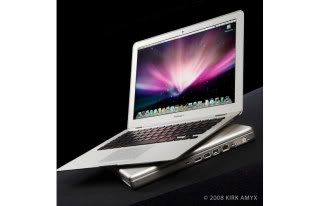
MacBooks Slow Down without Battery
Here's something I wouldn't have believed if it wasn't on Apple's website.It seems like Apple's MacBooks and MacBook Pros slow down their CPUs if they don't detect their battery attached.
Well, a lot of people usually removes their laptop's battery when working for long periods at home or at the office, to minimize wear and tear.
But, if you own an Apple laptop, doing that will cost you... a lot. We're talking about a 30% slowdown in processing speed!
Apple's official explanation is that this is done to prevent the laptop from shutting down if the A/C power adapter is unable to provide enough power to keep the laptop working at full power.
Is Apple cheap enough to save a couple of dollars in their A/C adapters instead of making it work as it should?
Wednesday, November 26, 2008
Dell Mini 9 with Touchscreen Mod
And speaking about the Dell Mini 9, don't forget that just like most other netbooks, you can easily add it a touchscreen.
via [jkkmobile]
via [jkkmobile]
Tuesday, November 25, 2008
YouTube 16:9
And after all this time, YouTube finally becomes a 16:9 widescreen player.
Besides the widescreen aspect ratio, YouTube's webpage has been expanded to 960px - to allow a better video quality - which, I remind you, can be up to 720p nearly High-Definition video quality!
Of course, lots of users are not happy with their 4:3 content now looking "outdated", but I guess it's the price to pay in this world of constant change and inovation.
Besides the widescreen aspect ratio, YouTube's webpage has been expanded to 960px - to allow a better video quality - which, I remind you, can be up to 720p nearly High-Definition video quality!
Of course, lots of users are not happy with their 4:3 content now looking "outdated", but I guess it's the price to pay in this world of constant change and inovation.
Monday, November 24, 2008
Quick Kill - Anti RPG Protection System
It's unbelievable the things we can do in a blink of an eye.
Imagine someone just shot a RPG at you... can you imagine it zooming in your direction?
Now, as that incoming RPG approaches, another small rocket is fired, aimed, and propelled to intersect the other one, destroying before it can hit you!
This Quick Kill protection system sure looks amazing... just watch the video.
Imagine someone just shot a RPG at you... can you imagine it zooming in your direction?
Now, as that incoming RPG approaches, another small rocket is fired, aimed, and propelled to intersect the other one, destroying before it can hit you!
This Quick Kill protection system sure looks amazing... just watch the video.
Sunday, November 23, 2008
Touchscreen Digiframe with Embedded PC
It seems that the netbook craze is finally expanding into other areas. And surprisinigly, it is HP that seems to be taking advantage of it by introducing the Atom platform into a new - and very interesting - area.
There are rumors that indicate HP to be working on a Atom-based Digiframe with touchscreen that will allow you to have a computer anywhere you'd have a digital photo frame... for less that $400.
As you can imagine, this would open up a lot of opportunities for people with "smart-homes", where similar control panels usually cost a lot more than that and offer a lot less.
Lets hope HP delivers on this - or any other manufacturer - as this would certainly be a huge success.
There are rumors that indicate HP to be working on a Atom-based Digiframe with touchscreen that will allow you to have a computer anywhere you'd have a digital photo frame... for less that $400.
As you can imagine, this would open up a lot of opportunities for people with "smart-homes", where similar control panels usually cost a lot more than that and offer a lot less.
Lets hope HP delivers on this - or any other manufacturer - as this would certainly be a huge success.
Saturday, November 22, 2008
How to Use Streetview on iPhone 2.2
And, to make it easeir for everyone who - like me - went crazy trying to find how to use Streetview in the latest 2.2 firmware update for the iPhone, here it is:
It's not hard after you know it, but I wasn't the only one wondering how to get there.
Besides, it's not that "user-friendly" to first have to drop a pin in order to access streetview, nor to drag it around hoping to find a streetviewable street.
But, let's wait for some more reactions from people around the globe and see how Apple reacts to it.
- You first need to drop a pin somewhere in the map
- Then you can drag it to the street you want
- To access streetview (if available) you need to click on that icon on the left on the pin's description
It's not hard after you know it, but I wasn't the only one wondering how to get there.
Besides, it's not that "user-friendly" to first have to drop a pin in order to access streetview, nor to drag it around hoping to find a streetviewable street.
But, let's wait for some more reactions from people around the globe and see how Apple reacts to it.
iPhone 2.2 - First Impressions
After a few hours of using version 2.2 of the iPhone here are my findings.
The map enhancements are certainly appreciated, especially if you happen to live in a city with "digitized" public transportation info. In Portugal, only Lisbon is currently supported - and I hope it won't take long for all other cities to do the same.
Being able to go from one place to the other using public transportation is a very nice addition when visiting a new city.
The walking directions are also nice.
A lot less "nice" is the Streetview implementation. Even if I don't consider myself a genious, I'm usually capable of finding my way around gadgets without reading instruction manuals. But, to find how to use streetview, to find where it was hiding, I had to google for it on the Internet!
Which got me thinking: was this really done by the same Apple usually known for doing "user-friendly" interfaces?
You first have to drop a pin, and then click on a small icon on its description - if that street happens to have streetview.
Maybe it's just me that find that a bit awkward and not very practical...
As for the crashing Safari (since 2.1 that Safari has been practially unsuable for me) I was hoping it would go bacl to the pre-2.1 days, where it was rock-solid.
The new URL+Search bar feels a little cramped... and I don't understand why they had to waste so much space on "Google" - as it doesn't even show the keywords you're searching for. Why couldn't they use a smaller icon for it?
As for stability, Safari crashed just a couple of minutes after using it - not a very nice start.
But I've since cleared all caches, so there was no "excuse" from the previous version, and will report back to you in a couple of days.
There are also some small details that should have been done from the start. When updating an App you no longer get a new icon while downloading, the status is updated in the existing App icon (at last!)
Though the option to install all updates is still missing - it was there a couple of updates back, I don't know why they ever took it, not to mention why they don't put it back.
Clicking the home button to go back to the first home page is but a sign of an issue Apple should better address, and soon.
The "nice" iPhone interface we all love might have served us well in pre-App Store days, where you had a couple of pages at most. Now, with users having lots of pages, flipping back and forth is certainly not a very good way to spend your time when you're searching for a specific App.
This shortcut to go back to the first page is just a way for Apple to say: "We know this isn't working."
And if they want to keep their lead as the best "user-interface" guys, they'll need to do better than that.
Even if it may hurt some, I think implementing some "folder icons" would probably do it. Why can't I place all my game apps, and seldom used utilities under some folder icons, instead of wasting "screens"?
But, they're the experts, I'm happy with any other solution they come up with.
The map enhancements are certainly appreciated, especially if you happen to live in a city with "digitized" public transportation info. In Portugal, only Lisbon is currently supported - and I hope it won't take long for all other cities to do the same.
Being able to go from one place to the other using public transportation is a very nice addition when visiting a new city.
The walking directions are also nice.
A lot less "nice" is the Streetview implementation. Even if I don't consider myself a genious, I'm usually capable of finding my way around gadgets without reading instruction manuals. But, to find how to use streetview, to find where it was hiding, I had to google for it on the Internet!
Which got me thinking: was this really done by the same Apple usually known for doing "user-friendly" interfaces?
You first have to drop a pin, and then click on a small icon on its description - if that street happens to have streetview.
Maybe it's just me that find that a bit awkward and not very practical...
As for the crashing Safari (since 2.1 that Safari has been practially unsuable for me) I was hoping it would go bacl to the pre-2.1 days, where it was rock-solid.
The new URL+Search bar feels a little cramped... and I don't understand why they had to waste so much space on "Google" - as it doesn't even show the keywords you're searching for. Why couldn't they use a smaller icon for it?
As for stability, Safari crashed just a couple of minutes after using it - not a very nice start.
But I've since cleared all caches, so there was no "excuse" from the previous version, and will report back to you in a couple of days.
There are also some small details that should have been done from the start. When updating an App you no longer get a new icon while downloading, the status is updated in the existing App icon (at last!)
Though the option to install all updates is still missing - it was there a couple of updates back, I don't know why they ever took it, not to mention why they don't put it back.
Clicking the home button to go back to the first home page is but a sign of an issue Apple should better address, and soon.
The "nice" iPhone interface we all love might have served us well in pre-App Store days, where you had a couple of pages at most. Now, with users having lots of pages, flipping back and forth is certainly not a very good way to spend your time when you're searching for a specific App.
This shortcut to go back to the first page is just a way for Apple to say: "We know this isn't working."
And if they want to keep their lead as the best "user-interface" guys, they'll need to do better than that.
Even if it may hurt some, I think implementing some "folder icons" would probably do it. Why can't I place all my game apps, and seldom used utilities under some folder icons, instead of wasting "screens"?
But, they're the experts, I'm happy with any other solution they come up with.
Sketchup 7
In case you've missed it, you can now upgrade to SketchUp 7, the free 3D planning tool from Google that allows easy 3D modelling whether you're trying to plan your dream house, or just figure out a way to efficientely move your furniture around...
Friday, November 21, 2008
Enhanced Eee PC 901
It seems the netbook wars is not getting any easier.
If you thought Asus Eee PC 901 was your number one choice... just wait a little longer - you might want to consider the new Eee PC 901 instead.
The new 901 models have a better battery (8700mAh) offering up to 8h of real use operation - and, more importantly, a SSD really worth of that name!
Look at those: 90 MB/S reading speed, 50MB/s write speeds! That's more like it!
If you're shopping for a netbook, be sure to check you grab one of these instead of the "old" 901's.
via [jkk]
If you thought Asus Eee PC 901 was your number one choice... just wait a little longer - you might want to consider the new Eee PC 901 instead.
The new 901 models have a better battery (8700mAh) offering up to 8h of real use operation - and, more importantly, a SSD really worth of that name!
Look at those: 90 MB/S reading speed, 50MB/s write speeds! That's more like it!
If you're shopping for a netbook, be sure to check you grab one of these instead of the "old" 901's.
via [jkk]
iPhone 2.2 Firmware Update is Out
If you have an iPhone or iPod Touch, you'll be pleased to know firmware update 2.2 is out.Major changes:
- Enhancements to Maps
- Google Street View
- public transit and walking directions
- display address of dropped pins
- share location via email
- Enhancements to Mail
- resolved isolated issues with scheduled fetching of email
- improved formatting of wide HTML email
- Improved stability and performance of Safari - (I sincerely hope so!)
- Podcasts are now available for download in iTunes application (over Wi-Fi and cellular)
- Decrease in call set-up failures and call drops
- Improved sound quality of visual voicemail messages
- Pressing the Home button from any Home screen takes you to the first Home screen
- Preferences to turn on/off auto-correction in Keyboard settings
Thursday, November 20, 2008
Minority Report Interface
Is there anyone who saw Minority Report without being amazed by the futuristic gesture based interface used by Tom Cruise?
Well, once again what began as a science-fiction concept has turned real...
Just watch this G-Speak, from Oblong, in motion:
g-speak overview 1828121108 from john underkoffler on Vimeo.
Well, once again what began as a science-fiction concept has turned real...
Just watch this G-Speak, from Oblong, in motion:
g-speak overview 1828121108 from john underkoffler on Vimeo.
Gmail Introduces Themes
If you haven't noticed yet, you will soon.
Gmail now has selectable themes.
This feature is being deployed right now. So... enjoy! :)
Gmail now has selectable themes.
This feature is being deployed right now. So... enjoy! :)
Wednesday, November 19, 2008
Rev for iPhone with OBD Hardware Available
Well... the missing piece is finally available - the Wifi enabled OBD-II adapter.
In Europe you can get the ElmCanII WLAN Intern ODB-II module from CarCode Müller for 189 Euros.
In the USA and Canada you can get it from Devtoaster official store for $229.
Tuesday, November 18, 2008
iPhone Google App - Now with Voice Recognition
It suffered some delays, but the latest Google Mobile App for the iPhone is finally out and available at the App Store.
And the main feature is: voice recognition.
You just need to place it like you were about to make a phone call and say the words/phrase you want to search.
From the quick tests I made, its accuracy was rather good.
Also, search results take your location into account - meaning, if you're searching for Italian restaurants, you'll be shown the ones closer to you first.
Highly recommended for every iPhone owner.
And the main feature is: voice recognition.
You just need to place it like you were about to make a phone call and say the words/phrase you want to search.
From the quick tests I made, its accuracy was rather good.
Also, search results take your location into account - meaning, if you're searching for Italian restaurants, you'll be shown the ones closer to you first.
Highly recommended for every iPhone owner.
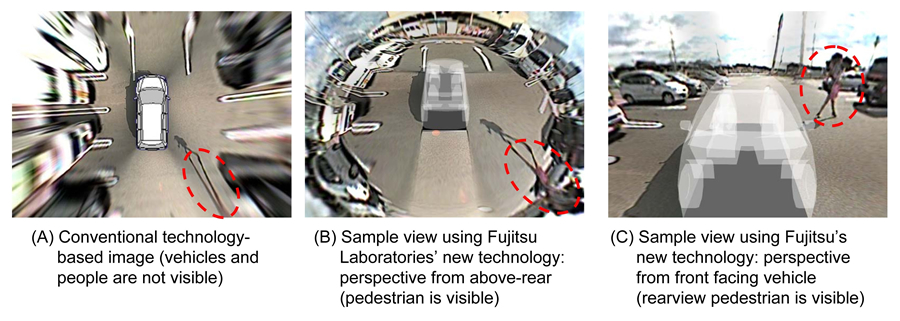
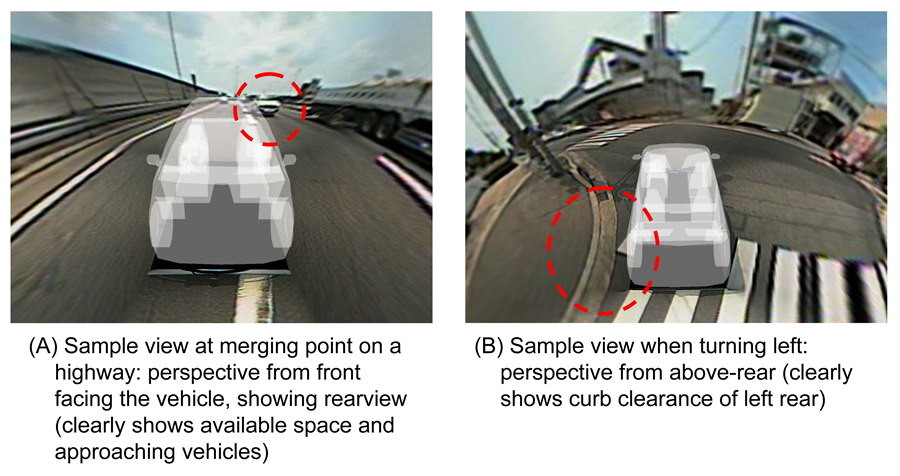
Virtual Automobile Camera
How many times have you wished to be able to have a bird's eye view or 3rd person view for your vehicle just as you have in a video game?
Well, according to Fujitsu you won't have to wait much longer.
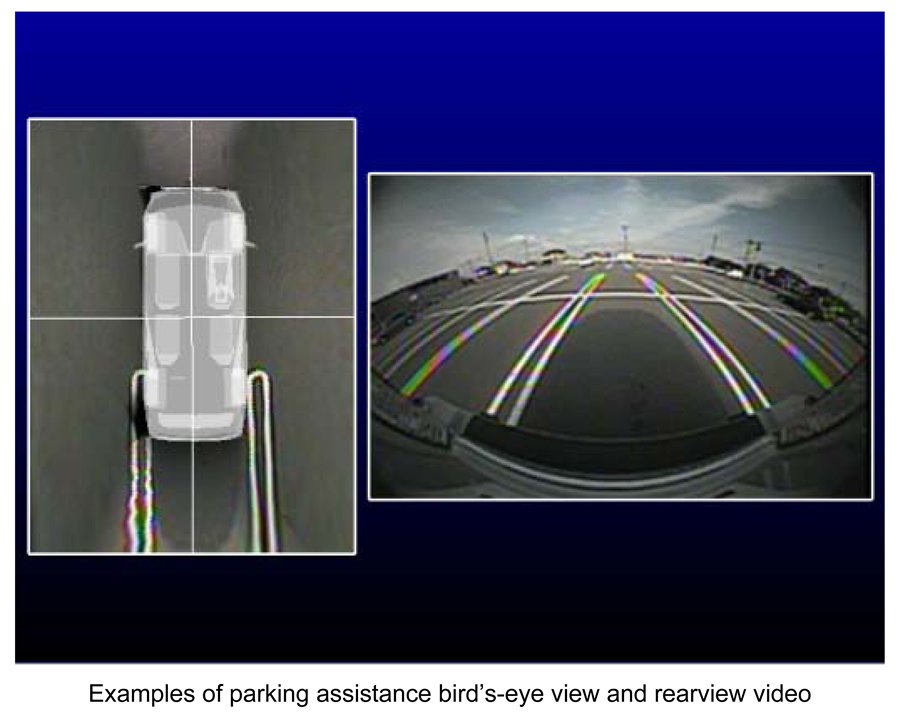
Current vehicle cameras often provide wide-angle camera views that aren't easy to interpret:
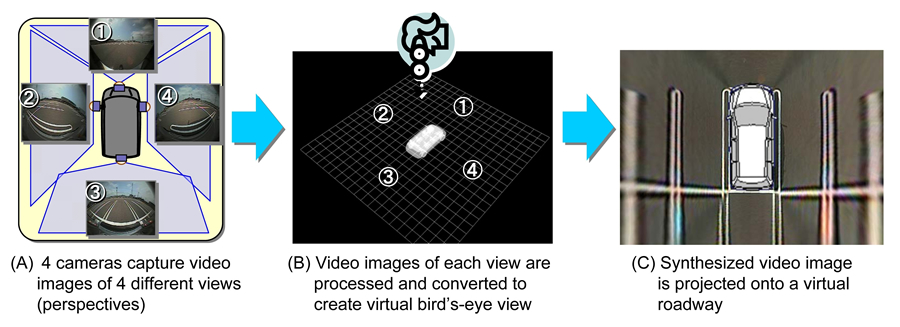
Sure, vehicle manufacturers have been working on it, using multiple cameras to provide a "stitched" bird's eye view that is easier to understand:
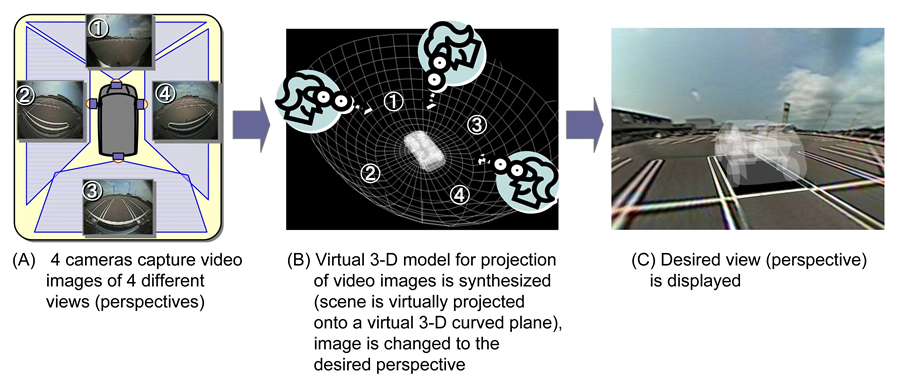
However, this Fujitsu system is even better, because it creates a 3D surround environment allowing an infinite number of viewpoints, depending on the situation:
If more and more people already spend most of their time looking to their GPS navigation screens inside, I wonde how it will be when this system gets out...
Well, according to Fujitsu you won't have to wait much longer.
Current vehicle cameras often provide wide-angle camera views that aren't easy to interpret:
Sure, vehicle manufacturers have been working on it, using multiple cameras to provide a "stitched" bird's eye view that is easier to understand:
However, this Fujitsu system is even better, because it creates a 3D surround environment allowing an infinite number of viewpoints, depending on the situation:
If more and more people already spend most of their time looking to their GPS navigation screens inside, I wonde how it will be when this system gets out...
Monday, November 17, 2008
High Definition YouTube
Although many doubted it would be possible, YouTube itself is showing that low quality blocky internet video is a thing from the past, and that the future is a lot brighter and with higher-definition.
Just check the following YouTube video, available in both normal and high-quality:
Normal Quality
High Quality
You can easily access the high quality video versions (when available) by entering &fmt=18 at the end of the youtube url link.
This specifies format "18" which uses a more advanced video codec (Mpeg4 h.264) and higher resolution.
But if you think that's all, you should know there are already videos using format 22 using up to 720p resolution. Just watch it in full screen and compare it to the other regular videos.
via [kottke]
Just check the following YouTube video, available in both normal and high-quality:
Normal Quality
High Quality
You can easily access the high quality video versions (when available) by entering &fmt=18 at the end of the youtube url link.
This specifies format "18" which uses a more advanced video codec (Mpeg4 h.264) and higher resolution.
But if you think that's all, you should know there are already videos using format 22 using up to 720p resolution. Just watch it in full screen and compare it to the other regular videos.
via [kottke]
Sunday, November 16, 2008
Windows 98 and XP Music
... love it or hate it, you can't deny Microsoft has a nice ring to it...
Here a music made solely using Windows 98 and XP's sounds .
Virtual Machine Migration from Intel to AMD
Ok, this video may not look like much... and it can even induce sleepiness in most people, but if you're reading this I assume you're interested in these topics. This video shows a virtual machine being transferred from one Intel PC to an AMD PC - while running - without any disruption.
Although this was shown during AMD's new "Shangai" Opteron processors presentation, the magic is provided by Red Hat virtualization, and isn't really tied to either Intel/AMD CPUs.
Labels:
AMD,
Intel,
Red Hat,
Virtual Machines,
Virtualization
Saturday, November 15, 2008
Animoto - Now With Text
Haven't heard of Animoto yet?
It's free online service that miraculously transforms your photos into a Pro-like music video.
A few snapshots of your holidays can become this:
(ah, how I miss my Australian holidays... :)
Well, now you can also add your own captions in there making it even more interesting...
(their demo video)
[Animoto]
It's free online service that miraculously transforms your photos into a Pro-like music video.
A few snapshots of your holidays can become this:
(ah, how I miss my Australian holidays... :)
Well, now you can also add your own captions in there making it even more interesting...
(their demo video)
[Animoto]
Friday, November 14, 2008
USB 3.0 Superspeed
And it looks that - finally - the new USB 3.0 Superspeed will be presented next week.
Promissing speeds up to 4.8Gbps, this new USB arrives at the right moment.
For instance, transfering a 25GB High-Definition movie takes approximately:
Let's wait and see what they'll show us next week.
Promissing speeds up to 4.8Gbps, this new USB arrives at the right moment.
For instance, transfering a 25GB High-Definition movie takes approximately:
- USB 1.0 - 9.3 hours
- USB 2.0 - 13.9 minutes
- USB 3.0 - 70 seconds
Let's wait and see what they'll show us next week.
Thursday, November 13, 2008
CPU Evolution
Computer CPUs are continuously evolving.
Just look at this chart plotting the evolution of Computer Power/Cost throughout the years.
That's why you shouldn't think you'll have to wait long till you have something like this when you open up your task manager on your home PC.
Yep, thay really is 256 CPU cores, although "virtual" ones (at least for now.)
Just look at this chart plotting the evolution of Computer Power/Cost throughout the years.
That's why you shouldn't think you'll have to wait long till you have something like this when you open up your task manager on your home PC.
Yep, thay really is 256 CPU cores, although "virtual" ones (at least for now.)
Wednesday, November 12, 2008
iPhone Clock
There are lots of different clock apps for the iPhone, but if you want something a bit more "stylish" then get this one while it's still available for free.
Clock for the iPhone
With several different viewing modes (supporting portrait and landsacape) and animated background effects, it might be just what you were looking for, to run when you have your iPhone in a bedside docking station.
Clock for the iPhone
With several different viewing modes (supporting portrait and landsacape) and animated background effects, it might be just what you were looking for, to run when you have your iPhone in a bedside docking station.
Tuesday, November 11, 2008
Gmail Introduces Video-Chat
If you're not much of a typing person, you'll be pleased to know you can now do video-calls from within Gmail.
Unfortunately, you'll need to download a small plugin; byt hey - it's certainly better than requiring running a full-fledged external video-chat program. And you won't need to leave your browser's gmail window.
AVG Antivirus considers Windows a Virus
If you happen to AVG antivirus on Windows XP - beware! A recent update causes 'user32.dll' (a critical system file) to be wrongfuly detected as a Virus, and recommends it to be deleted.
If you do so, you'll immediately wreck your Windows and be unable to use it.
A newer AVG update already fixes this issue.
If you have messes with your user32.dll, then you'll need to restore it from your original windows CD, or use another boot CD like UBCD to repair it.
If, after this issue you feel you better find another free antivirus alternative, don't forget to check Avira - which is the one I use; lightweight and free.
If you do so, you'll immediately wreck your Windows and be unable to use it.
A newer AVG update already fixes this issue.
If you have messes with your user32.dll, then you'll need to restore it from your original windows CD, or use another boot CD like UBCD to repair it.
If, after this issue you feel you better find another free antivirus alternative, don't forget to check Avira - which is the one I use; lightweight and free.
GPS Navigator with 3D Terrain
After the 3D perspective view, and 3D models of buildings and monuments, it's time for 3D terrain to come to GPS navigators.
That's what Navigon 8100T does: it is able to show you terrain elevation in 3D.
Personally, I don't know if this is indeed useful or if it will only make it harder to interpret the maps - considering you should spend most of your time looking at the road ahead and not to the pretty graphics on the navigator's screen. But if you're a fan of the latest gadget and want to show off your GPS around, this might be what you're looking for.
That's what Navigon 8100T does: it is able to show you terrain elevation in 3D.
Personally, I don't know if this is indeed useful or if it will only make it harder to interpret the maps - considering you should spend most of your time looking at the road ahead and not to the pretty graphics on the navigator's screen. But if you're a fan of the latest gadget and want to show off your GPS around, this might be what you're looking for.
Monday, November 10, 2008
Mgestik - Gesture Recognition System
If you liked Minority Report, then you'll be pleased to know that you'll soon be able to gesture your computer around. Meet Mgestik - a gesture recognition system that may soon replace our trusted old mouses in the way we interact with computers.
Sunday, November 9, 2008
Laser Projectors
I don't even have to tell you how desperate I am to see one of those LaserVue sets - the ones using lasers as light sources and therefore able to show colors well beyond traditional technologies.
While LaserVue is a rearprojection TV set, it seems that the same concept will soon be used in front projection systems.
Up till now, 35mm film has regarded as the reference in color reproduction, able to reproduce 60% of the color gamut visible by the human eye.
However, these laser projector are capable of reproducing 80% of the visible spectrum - becoming the new reference.
(And, with more pwerful lasers, it might even reach 90% of the visible color range!)
I just hope these projectors arrive to my local cinemas soon - or even better - that I can afford one at home! :)
While LaserVue is a rearprojection TV set, it seems that the same concept will soon be used in front projection systems.
Up till now, 35mm film has regarded as the reference in color reproduction, able to reproduce 60% of the color gamut visible by the human eye.
However, these laser projector are capable of reproducing 80% of the visible spectrum - becoming the new reference.
(And, with more pwerful lasers, it might even reach 90% of the visible color range!)
I just hope these projectors arrive to my local cinemas soon - or even better - that I can afford one at home! :)
Saturday, November 8, 2008
Fingerprint Scanning LCD
If you were like me, you couldn't help but chuckle whenever you watched a sci-fi movie where, at some point, someone would press their fingers/palm against an LCD to scan their fingerprints.Well, once again we're shown that fiction does push science further and faster - and what's fiction eventually ends up becoming reality.
AU Optronics has just annouced an LCD with an integrated light sensor and... as you'd expect from the title: a fingerprint scanner.
So, next time we watch one of those science-fiction movies... this part won't be able to be considered "fiction" anymore.
via [gizmodo]
Friday, November 7, 2008
Eee PC Touchscreen Kit
I have already talk about those "courageous" people that have no problem opening up their netbooks (and all other gadgets) and add missing features like 3G connectivity, GPS - and of course - a touchscreen.For most of us, the thought of opening up a brand new netbook like a Eee PC or a Acer One and start soldering wires is a bit daunting. But about if I told you can do it in a much simpler way? You just need to get this Eee PC Touchscreen Kit from Ebay.
It has everything you need to add a touchscreen to you Eee PC 900/901 and/or Acer Aspire One - and best of all: there's no soldering required!
What are you waiting for?
via [Engadget]
Labels:
Aspire One,
Eee PC,
Mods,
Netbook,
Sub-Notebooks,
Touchscreen
Thursday, November 6, 2008
Microsoft Surface SecondLight Explained
I'm sure some of you didn't quite get how Microsoft's Surface SecondLight works. So, here a video explaining how those amazing effects are possible.
Hope that help clear things out a bit...
Labels:
Microsoft,
Multitouch,
SecondLight,
Surface,
Touchscreen
WiFi WPA Cracked
Everyone has been told that using WEP for securing their WiFi network is practically as good as having an open network. You've probably heard time and time again, from your "geek" friends: "Use WPA!"Well... today you can tell them back: "WPA is useless just like WEP!"
WPA has been cracked and is now as ineffective as WEP.
That means that, unless you want to run a open network, you better upgrade your WiFi network security and start using WPA2 - which should keep you safe from casual hackers... (but not the ones using their GPUs to crack it.)
Wednesday, November 5, 2008
Windows 7 Taskbar
One of the most visible changes in Windows 7 is its upgraded taskbar.
But better than any written explanation, is seeing how it works. Check the following video:
I think its a step in the right direction; but I don't think it will be enough to "amaze" anyone already using OS X or any Compiz-flavored Linux, both offering similar features for quite some time now.
But better than any written explanation, is seeing how it works. Check the following video:
I think its a step in the right direction; but I don't think it will be enough to "amaze" anyone already using OS X or any Compiz-flavored Linux, both offering similar features for quite some time now.
Labels:
Microsoft,
Operating Systems,
Windows,
Windows 7
Fly Stick Van de Graaff Levitation Wand
I didn't even had to read anything else - it had levitation in it - I WANT IT! :)
Copperfield, eat your heart out. See what you can do with this:
Fly Stick Van de Graaff Levitation Wand
It's an electrostatic generator wand that can keep those mylar shapes "levitating" in the middle of the air.
... now we just have to wait for them to start using the same principles and offer us a "hover-board", right? :)
[Thinkgeek]
Copperfield, eat your heart out. See what you can do with this:
Fly Stick Van de Graaff Levitation Wand
It's an electrostatic generator wand that can keep those mylar shapes "levitating" in the middle of the air.
... now we just have to wait for them to start using the same principles and offer us a "hover-board", right? :)
[Thinkgeek]
Obama Wins
It isn't exactly a secret - in fact, it's quite the opposite - but I think he deserves a mention here anyway.
I sicerely hope Barack Obama's victory in USA to mark the beginning of a new age in stability, rationality, and humanity. One that can recover from the politics of fear implemented in the past years.
... and who knows? Barack's energy might even be enough to change things in this side of the Atlantic as well, and change the abuses we're experiencing in our own countries - with powerful conglomerates constantly riding above the laws, and doing whatever they want.
(Such as banks that just last year were announcing record profits, and are now begging for Government'smoney to stay afloat... our money!)
I sicerely hope Barack Obama's victory in USA to mark the beginning of a new age in stability, rationality, and humanity. One that can recover from the politics of fear implemented in the past years.
... and who knows? Barack's energy might even be enough to change things in this side of the Atlantic as well, and change the abuses we're experiencing in our own countries - with powerful conglomerates constantly riding above the laws, and doing whatever they want.
(Such as banks that just last year were announcing record profits, and are now begging for Government'smoney to stay afloat... our money!)
Tuesday, November 4, 2008
Microsoft Surface SecondLight
As if Surface, hasn't enough of a "show" Microsoft has shown their "next generation" Surface tables - a.k.a. SecondLight and the result is... impressive!
SecondLight builds upon the original Surface concept but adds a significant unique new feature that makes it look magical. Instead of a simple acrylic display, images are projected on a material than can toggle from transparent to diffuse state hundreds of times per second.
This allows the embedded projectors to project, not only on the table's "surface" but also project on objects above it.
As this happens hundreds of time per second, we perceive two different flicker-free images on the two planes.
It's not that usual to be amazed in this world - but this SecondLight certainly deserves its "wow- factor"!
SecondLight builds upon the original Surface concept but adds a significant unique new feature that makes it look magical. Instead of a simple acrylic display, images are projected on a material than can toggle from transparent to diffuse state hundreds of times per second.
This allows the embedded projectors to project, not only on the table's "surface" but also project on objects above it.
As this happens hundreds of time per second, we perceive two different flicker-free images on the two planes.
It's not that usual to be amazed in this world - but this SecondLight certainly deserves its "wow- factor"!
Monday, November 3, 2008
Android vs iPhone [Code Performance]
It looks like Android still has some kinks needing ironing out, at least if they want to attract even more developers.In a very simple test, to try to assess its code performance Android's Java was about 100 times slower than the same code running on an iPhone.
(And before anyone starts taking me out of context: remember I'm saying: 'a very simple test'! And I'm referring just to the Java VM code - not Android's API functions and routines.)
Although this doesn't mean you can't develop very interesting applications (just take a look at whole those already out there) it may certainly drive a few of them away because they'll be unable to implement "high-performance" routines.
I'm curious to see if Google will address this "problem" in the upcoming revisions and firmware updates.
Sunday, November 2, 2008
Heated/Cooled USB Keyboard
I really could use one of these.
This Thanko keyboard is quite unique: it will not only keep your hands and fingers cool in the hot Summer days, but it will also warm you up when the Winter comes.
For about $50, I'm sure no one will be able to resist it. Just try typing on it for a while with frozen fingers, and you'll wonder how you were able to survive without it for so long.
via [gizmodo]
This Thanko keyboard is quite unique: it will not only keep your hands and fingers cool in the hot Summer days, but it will also warm you up when the Winter comes.
For about $50, I'm sure no one will be able to resist it. Just try typing on it for a while with frozen fingers, and you'll wonder how you were able to survive without it for so long.
via [gizmodo]
Saturday, November 1, 2008
PDFescape - Byebye Acrobat
If you ever need to edit or create a PDF file but have no suitable software installed, it's time to turn to the PDFescape. If you think Web Apps are useless just wait till you see everything you can do with PDFescape without installing anything in your computer - everything is done inside your browser.
With PDFescape you can edit and create PDF without setting sights on Adobe's Acrobat.
PDF Forms are also easily filled and designed.
So, next time you need to PDF something, remember: PDFescape.
Annoying Dialog Boxes
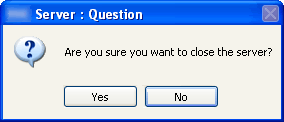
How can we still stand up with such annoying and stupid (and easy to fix!) flaws as the ones plaguing Windows dialog boxes?
Dialog boxes are used for many purposes - one of which is to ask you for confirmation for something you're trying to do.
But, current operating systems are known as "multi-tasking", because you can be doing lots of stuff at the same time - like, writing an email, while copying files from one place to another.
And the result is: you're writing as usual, and then suddently a dialog box pops up and before you know it you already typed Y, N, C, "Space", or any other key that triggers an option and makes it go away.
So... what did you just do??? Did you cancel it? Did you delete all your files by accident? What?
That's why internet browsers now implement a countdown timer to "enable" to dialog box - so you can really see what you're doing.
How is it possible for Windows to suffer from this stupid issue still?
Now I'll have to double check if everything I wanted to copy was indeed copied, or if I chose not to overwrite files, or whatever...
.
P.S. Not to mention those annoying modal dialog boxes, that stop you from clicking anywhere else.
Dialog boxes are used for many purposes - one of which is to ask you for confirmation for something you're trying to do.
But, current operating systems are known as "multi-tasking", because you can be doing lots of stuff at the same time - like, writing an email, while copying files from one place to another.
And the result is: you're writing as usual, and then suddently a dialog box pops up and before you know it you already typed Y, N, C, "Space", or any other key that triggers an option and makes it go away.
So... what did you just do??? Did you cancel it? Did you delete all your files by accident? What?
That's why internet browsers now implement a countdown timer to "enable" to dialog box - so you can really see what you're doing.
How is it possible for Windows to suffer from this stupid issue still?
Now I'll have to double check if everything I wanted to copy was indeed copied, or if I chose not to overwrite files, or whatever...
.
P.S. Not to mention those annoying modal dialog boxes, that stop you from clicking anywhere else.
Subscribe to:
Comments (Atom)